

Article by

Topics

One platform to manage the entire IT device lifecycle
GET STARTEDEfficiently managing IT asset infrastructure is crucial for productivity, security, compliance, and smart spending. But with all of the complexities that come along with IT asset management, it can be an overwhelming process.
That’s why many companies opt for using IT asset management as a service.
What is IT Asset Management as a Service?
At its core, this involves outsourcing the IT asset management process to a third-party expert.
From contract management to asset discovery to procurement to deployment to maintenance to retirement, ITAM as a service streamlines asset management end-to-end, while providing maximum efficiency, asset visibility, and asset data security every step of the way.
Rather than handling IT asset management in-house, something that can be time-consuming and overwhelming, this option passes tasks off to a professional asset manager who understands the ins and outs and is equipped to adapt to the ever-changing information technology landscape.
It’s their job to manage the entire asset lifecycle for hardware assets, software assets, and cloud asset technology so businesses don’t have to do any heavy lifting. Instead, effective ITAM provides much-needed operational relief so they’re free to focus on core work operations while knowing that IT asset lifecycle management is in good hands.
And when you look long-term, partnering with an IT asset management professional can have a huge impact because of the amount of time many organizations typically spend on these tasks.
For perspective, 37% of companies spend over 21 hours per week on ITAM, 25% spend 11 - 20 hours per week, and 27% spend 6 - 10 hours per week.
The remaining 10% spend 2 - 5 hours per week, and 1% spend 0 -1% per week.
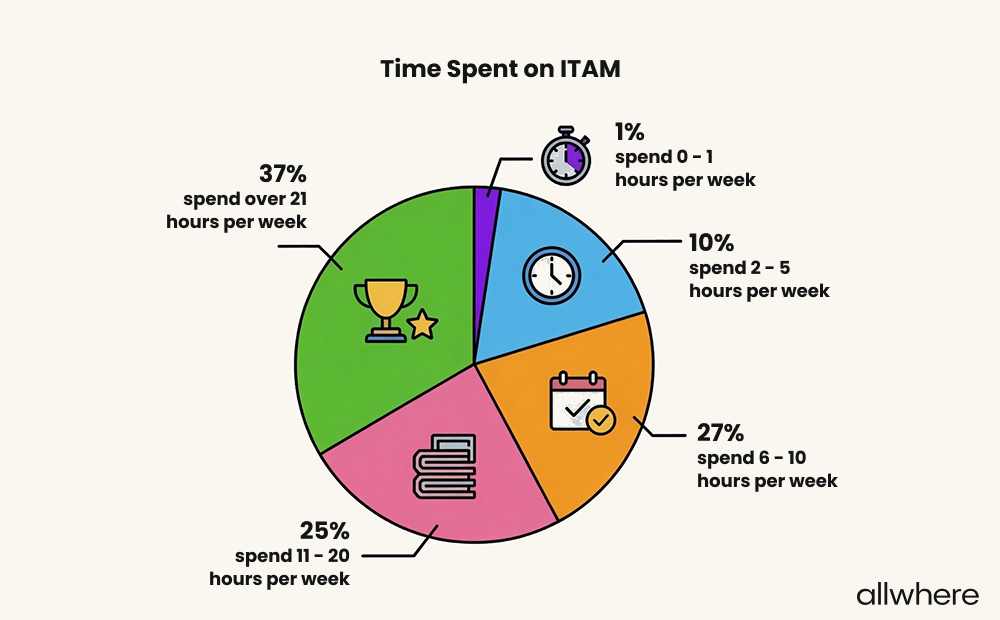
When you add it up, this means that nearly two-thirds of organizations spend a minimum of 11 hours per week on ITAM, with many spending much more time.
Besides merely reducing manual tasks, service management providers often offer organization owners tools like asset tracking, automation capabilities, and asset data analytics insights so they can see the big picture, continually optimize asset performance, and make more informed decisions regarding asset utilization.
That way, businesses can get the most from their IT investment, while also:
- Getting assistance with vendor management
- Streamlining asset tracking
- Reducing waste
- Improving data security
- Increasing compliance
- Optimizing risk management
- Making better decisions.
And because service management can often be done globally, this is a great option for companies with a global workforce that have to deal with immense logistical challenges.
Note that it can be especially valuable for those needing enterprise asset management who have to deal with ITAM logistics at scale.
What is an IT Asset?
An IT asset is any form of technology that’s used in operations. This can be broken down into three main categories.
- Hardware - Servers, computers, laptops, monitors, mobile devices, accessories, and peripherals
- Software - CRM, ERP, collaboration tools, productivity software, and software licenses
- Cloud-based assets - SaaS tools, online data storage platforms, and data analytics
There are other examples, but these are some of the most common asset relationships found in a modern organizations IT assets.
The 4 Steps of the IT Asset Management Process
1. Asset Discovery and Inventory
This involves a mix of mobile device management (MDM) enrollment, identifying SaaS integrations, procuring network data, and ongoing reconciliation.
From there, you can gain a firmer grasp of what you currently have in your network and gradually improve visibility over time.
Whether it’s servers, monitors, laptops, mobile devices, software, cloud-based tools, or anything else, information is gradually condensed into a unified configuration management database for an easy bird’s-eye view. That way, you have an objective overview of IT resources within your network.
Not only does asset discovery and inventory save time, but it also drastically reduces issues that can stem from human error. And because many tools will pinpoint unauthorized software, this can improve your data security and compliance as well.
2. Procurement and Deployment
During the procurement phase of asset lifecycle management, a service management provider acquires assets from a vendor.
And during deployment, they configure and distribute assets to employees, while ensuring that assets get into the right hands and that onboarding can be done quickly and smoothly.
There are three main ways to go about this.
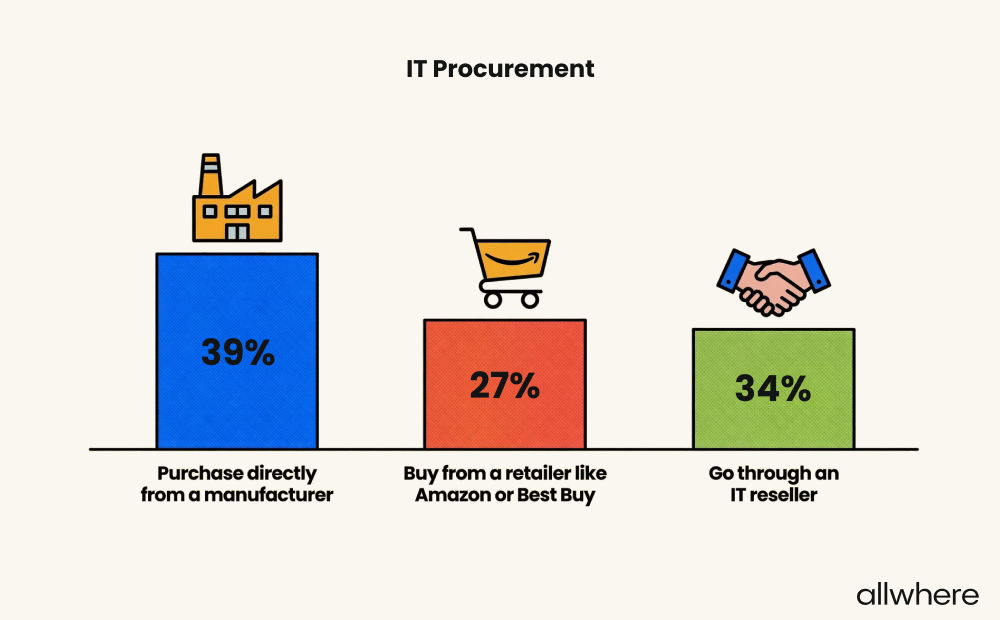
One option is to buy directly from a manufacturer (this is done by 39% of companies). Another is to buy from a retailer like Amazon or Best Buy (27% of organizations do this).
The third option is to partner with an IT reseller like allwhere, which is done by 34% of companies.
For example, allwhere partners with an extensive network of reputable vendors to find the exact equipment you need, regardless of your specifications. Because we’re not reliant on a single vendor, we can use alternate sourcing in case one vendor doesn’t have what you need.
And because we offer global coverage, our IT procurement services allow us to support a modern workforce anywhere in the world, for maximum flexibility and reliability.
When it comes to deployment, allwhere integrates with most MDM solutions, which means you can effortlessly configure your devices to get your employees quickly up and running during onboarding.
Another major benefit of partnering with a third-party like allwhere is that it significantly increases shipping reliability. Whether it’s during deployment or, as we’ll discuss later, retrieval, reliability is critical.
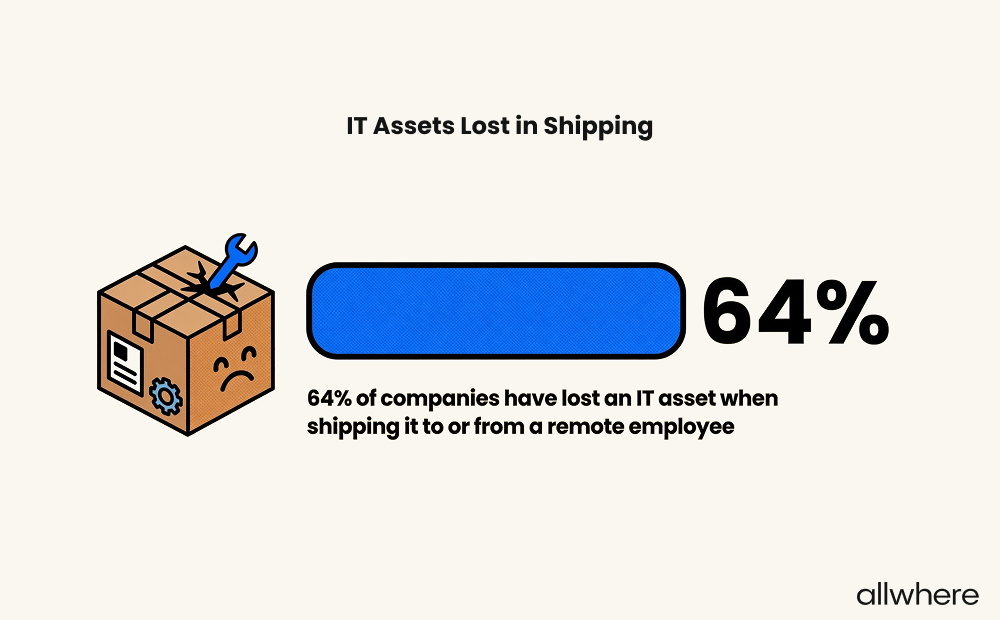
That’s because nearly two-thirds (64%) of today’s companies have lost an IT asset when shipping it to or from a remote employee.
And when an asset has to be recovered, more than half of our survey respondents said it took one to two weeks, with some citing that it took as long as three weeks.
But when you have a professional third-party on your side, they can work out the logistical kinks to ensure physical assets consistently reach their destination on time.
Because of the access to a wide variety of vendors, the hands-off nature of this setup, and shipping reliability, this is rapidly becoming a popular choice for many companies.
3. Maintenance and Monitoring
A huge part of enhancing asset performance and maximizing equipment lifespan is performing continual maintenance.
During this step, organizations can leverage ITAM as a service to streamline maintenance to keep track of when assets were purchased, when they were received, and when upgrades or updates need to be made.
That way, they can get notifications on things like when a device needs to be upgraded, when software has become outdated, and potential security vulnerabilities. Once it’s time for repairs, they can see repair options and streamline this process as well.
In turn, this should help improve the collective performance of your network’s IT assets and extend their lifespan.
As for monitoring, a mix of IT asset management services and asset management software can offer insights into underutilized equipment and software, so you’ll know what you could potentially eliminate from your network for greater efficiency and cost savings.
4. Retirement and Disposal
At some point, every piece of IT equipment will reach the end of its lifespan. This marks the final step of IT asset management, where a device is either retired or disposed of.
In some cases, it may make sense for organizations to resell a device in a secondary market. Other times, recycling is the best option, where reusable components are scavenged — both of which can help boost overall ROI.
Or if a device is no longer usable, it should be responsibly disposed of while deleting sensitive asset information and accounting for environmental compliance protocol.
Regarding who’s responsible for device retrieval within an organization, our survey found the following breakdown.
For 84% of companies, IT personnel handle this process. For 39% of companies, it’s HR personnel. And for 53% of companies, it’s a direct supervisor.
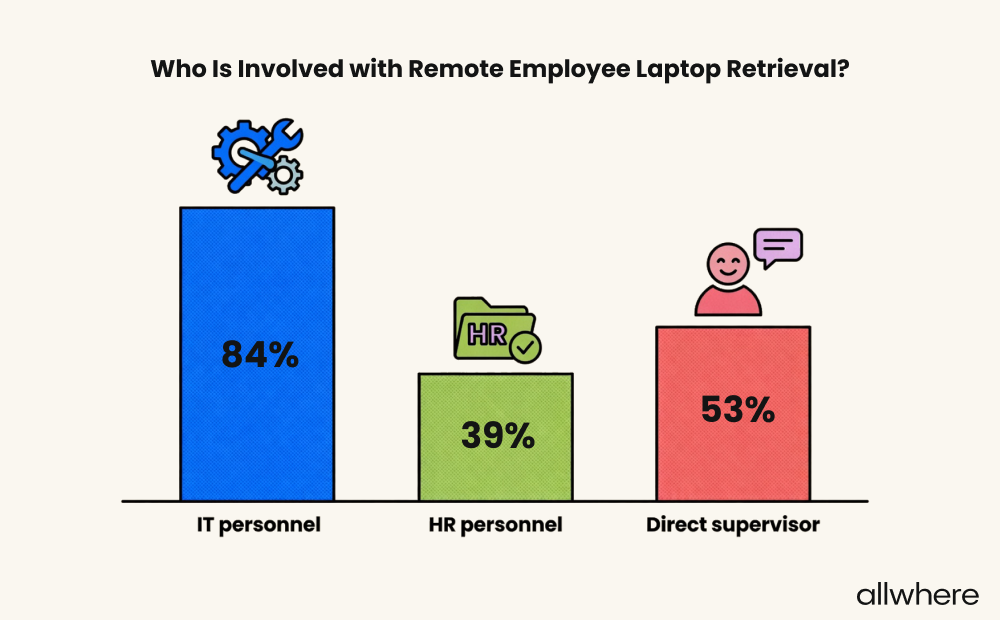
Note that our survey featured a multi-selection question to capture everyone responsible for IT asset retrieval.
What’s interesting is that many people assume that HR is primarily involved, but in reality, it’s actually IT. So, in addition to countless other tasks, retrieval can really put a strain on IT manpower.
Using IT asset management services is beneficial here because a third-party provider can help you maximize your ROI if you’re retiring a device or ensure compliance standards if you choose to dispose of it.
For instance, they may maintain the necessary documentation in the event of an audit or use certified disposal services to prevent e-waste. They’ll also carefully manage data to ensure no sensitive information is leaked.
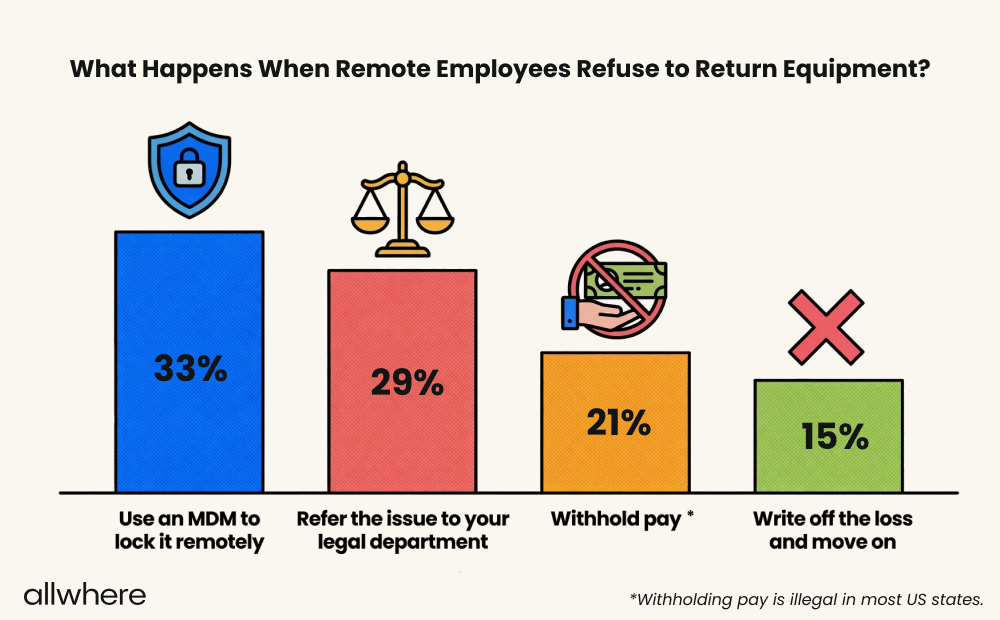
One other thing to keep in mind is figuring out what to do when a remote employee refuses to return equipment.
For instance, you may run into a situation where you send someone a laptop or mobile device when onboarding. But once they leave, they’re unwilling to send it back.
In this scenario, 33% of companies lock a device remotely using an MDM, 29% refer the issue to their legal department, 21% withhold pay (something that’s illegal in most states), and 15% simply write off the loss.
Having an ITAM professional on your side can be helpful here as well, as they can provide guidance on how to effectively approach the situation.
If you’re looking for a definitive list of best practices when approaching ITAM, check out our IT Asset Management Best Practices.
Factors to Consider When Choosing ITAM Software
Purpose
Start by identifying your specific goals when implementing ITAM into work operations.
Do you primarily need asset management software for hardware? For software? For digital assets? Or do you need cloud asset management for cloud-based assets?
Are you looking to increase network visibility? Are you trying to improve asset data security? Industry compliance?
Note that our survey pinpointed the top ITAM challenges, and according to our respondents, the number one challenge was asset tracking and inventory accuracy.
This was followed by equipment recovery and onboarding at number two, security, compliance, and privacy at number three, and vendor selection and procurement at number four.
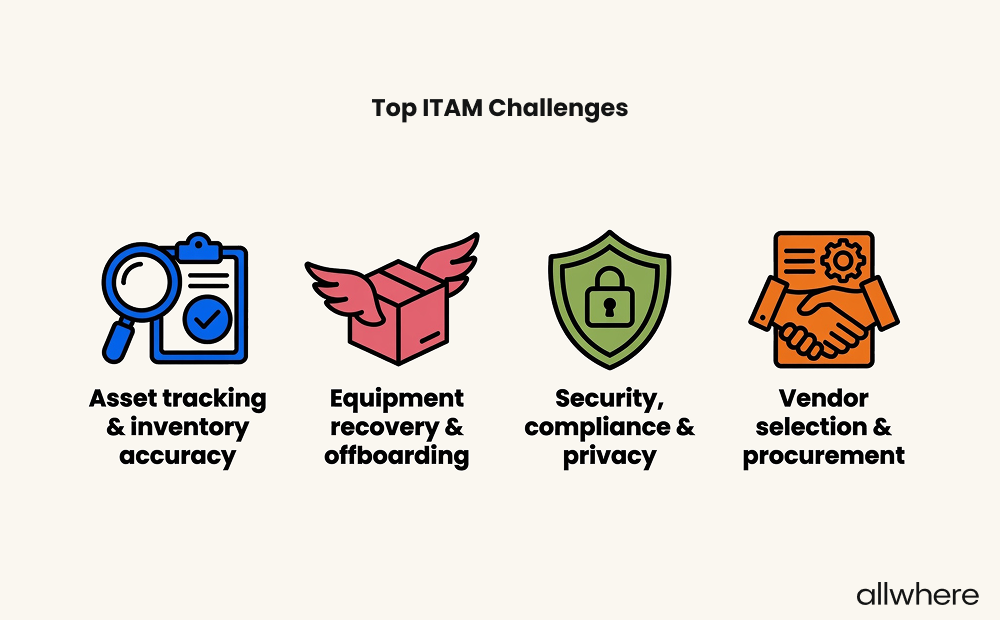
So this is helpful data to keep in mind when you’re identifying your primary goals with organization stakeholders.
Also, are you looking for an entirely hands-off solution? Or do you still want to be more involved in a solution’s utilization and making decisions involving operations management, inventory management, and software license management?
Do you have very exact requirements when procuring hardware assets and technology assets from a vendor? Or are you more flexible?
Having a clear understanding of your ITAM process goals should help steer you toward the optimal ITAM technology with the exact capabilities you need to increase productivity, operational efficiency, and profitability.
Cost
Pricing can vary considerably among service providers like ServiceNow ITAM, Freshservice IT Asset Management, Jira Service Management, and allwhere.
Before scheduling demos or seriously considering your options, you should pinpoint a budget range so you know what you’re working with beforehand, as this is a key part of ITAM best practices.
What’s your ideal cost? What’s the absolute most you’re willing to pay?
Would you prefer a monthly or annual subscription? Will your budget increase over time along with business growth?
These are some key questions to ask.
Additionally, consider scalability, as many customers require asset management tools for both hardware asset management and software asset management that are flexible enough to support ongoing growth and increased asset usage.
Technical Support
Any time there’s a new work solution like ITAM implementation, change management is a concern, and you can expect some degree of friction as you learn the ropes and your employees go through onboarding.
That’s why strong technical support is critical for an asset management system, especially during the initial stages of implementation.
Ideally, you’ll have access to 24/7 support and robust resources for quickly finding answers to questions and handling troubleshooting. This will be important for swiftly working through issues and avoiding unnecessary downtime.
To gauge technical support, check out a potential asset management software provider’s website to see what’s available (e.g., a help center) and what’s involved with contacting customer support.
Does a provider make it easy to find customer support with a dedicated resource on their website? Or does it feel like you have to jump through hoops to get an issue resolved?
Reviews and Ratings
Once you’ve narrowed it down to a few potential service providers, we suggest looking at multiple ratings and reviews from both satisfied and dissatisfied customers to gain a clear perspective of what the collective experience is like.
Be sure to pay attention to patterns in service capabilities, customer service, reliability, troubleshooting, and overall customer experience.
Testimonials should give you a pretty good idea of what to expect. But it’s also smart to dig deeper by looking at case studies to see how big an impact ITAM software has had on other companies’ bottom line.
And if you can find videos from real customers in your industry, that’s even better, as you can see firsthand what their experience has been like.
How to Get Started with ITAM
If you feel that ITAM as a service is right for you, take time to consider the four factors mentioned above — purpose, cost, technical support, and ratings.
From there, shortlist the service providers that best fit your company’s specific needs. Then, reach out for demos and free trials to see each solution in action until you know for sure what the best fit is.
To learn more about how allwhere can simplify IT asset management end-to-end, save you time, and reduce your workload, schedule a platform demo here.
