

Article by

Topics

One platform to manage the entire IT device lifecycle
GET STARTEDTo pinpoint exactly what today’s companies are doing to optimize ITAM, we surveyed full-time IT workers in the US responsible for IT asset management. (Methodology is in the article footnotes*.) We also interviewed multiple ITAM consultants for pro tips.
They shared the best practices that they engage in and their biggest pain points. Here’s what we found.
Survey Key Findings
- 84% of the time, IT personnel are responsible for equipment retrieval during employee offboarding, while HR personnel are only involved 39% of the time.
- 62% of respondents spend at least 11 hours or more on IT asset management in a normal week
- For IT procurement, 39% respondents purchase directly from a manufacturer, 34% buy through an IT reseller, and 27% buy direct from a retailer.
- Most device retrievals take 1-2 weeks.
- 64% of companies have lost an IT asset during shipping.
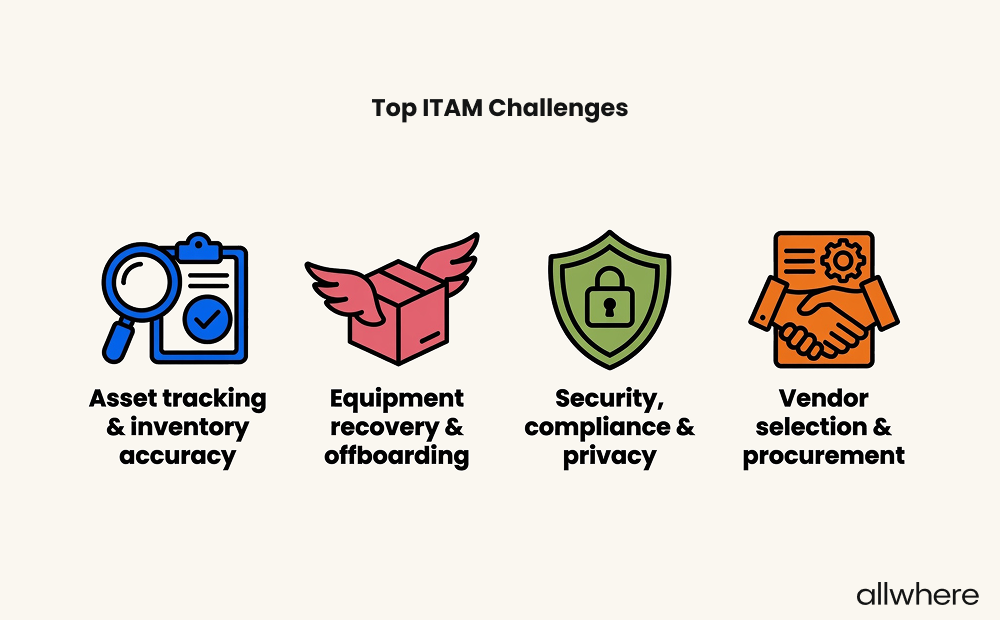
- The top four cited ITAM challenges were: 1. Asset tracking/inventory management, 2. Equipment recovery/offboarding, 3. Security, compliance & privacy, and 4. Vendor selection & procurement.
IT Asset Management Best Practices
1. Decide Who’s Going to Do the Work
Before diving into things like technology, vendors, and logistics, you first need to figure out who’s going to be responsible for what. In fact, this is a key starting point for many IT asset management experts.
If, for instance, you’re in a small business, there’s a good chance that ITAM responsibilities will fall into the hands of a single individual within your organization.
However, if you’re running a larger company or are on the enterprise level, these tasks may be split up across different departments. Or you may have a dedicated department whose core responsibility is ITAM.
Whatever the case, it’s important to create fully fleshed out workflows and accountability, so you’re clear about who’s in charge of what tasks and what the chain of command is.
In terms of key tasks, some examples include:
- Budgeting
- Contract negotiation and management
- Asset procurement and deployment
- Asset tracking and maintenance
- Asset disposal
- Security
- Analytics
As for the specific positions that are in charge of contacting employees about company-owned equipment when they leave, this breaks down as follows:
- IT personnel - 84%
- HR personnel - 39%
- Direct supervisor - 53%
(This was a multi-selection question for everyone who is involved in the process.)
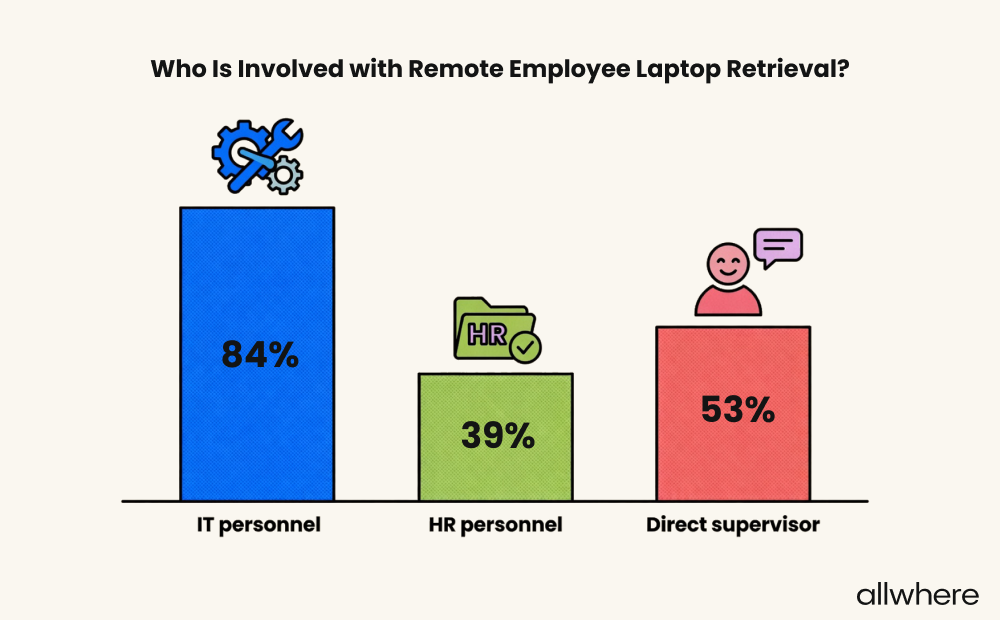
By these numbers, an IT professional was almost always involved in the asset retrieval process (84%). The direct supervisor was also involved about half the time, and HR personnel also got involved 39% of the time.
Contrary to what many contributors say in the popular IT SubReddits, device retrieval typically does fall on IT personnel, not HR!
If you’re wondering how much time the individual in charge of IT asset management spends on those tasks per week, the data from our survey found that:
- 1% spend 0 - 1 hours per week
- 10% spend 2 - 5 hours per week
- 27% spend 6 - 10 hours per week
- 25% spend 11 - 20 hours per week
- 37% spend over 21 hours per week
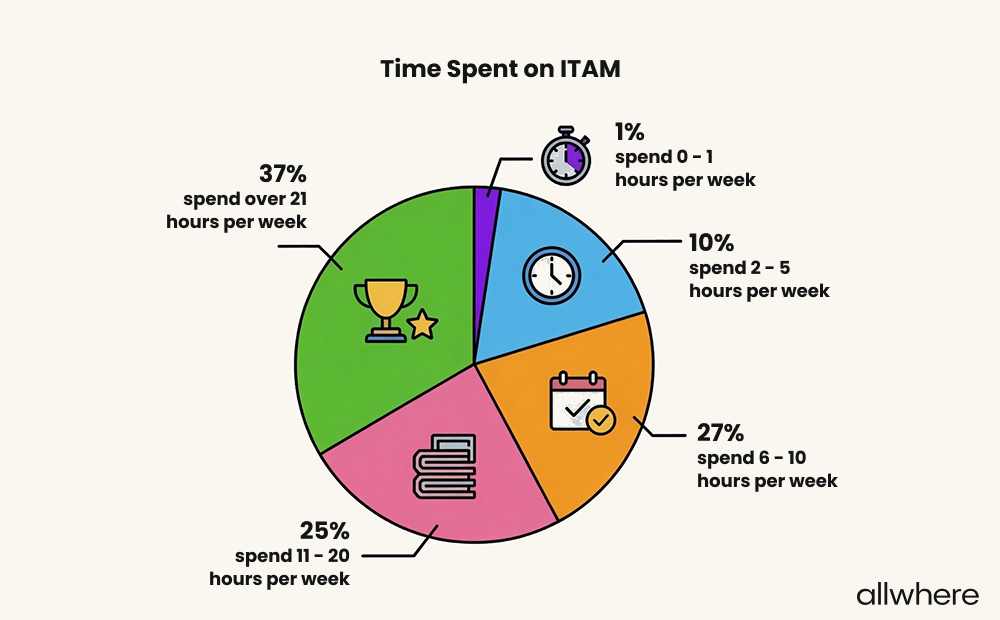
So, as you can see, 62% of IT professionals in charge of ITAM spend at least 11 hours per week, which shows that having a firm grasp on ITAM processes is fairly labor-intensive.
Section Takeaway
84% of survey respondents said that IT people were responsible for IT asset management, while only 39% of respondents said that HR was responsible for it.
In 62% of companies, ITAM responsibilities require at least 11 hours per week or more!
2. Pick Software and Tools
Once you’ve gotten ownership pinned down, the next step is to choose the right software and tools to support your IT asset lifecycle from start to finish.
At a bare minimum, you’ll want asset tracking software and mobile device management (MDM) software.
Tracking software provides an overview of IT inventory, including:
- Who has what assets
- What the location is
- When assets are in transit
- When they’re in storage
- Your maintenance schedule
MDM allows you to manage your organization’s assets remotely, where you can install software, make updates, lock devices, and wipe devices if security has been compromised.
If you have a remote/hybrid-centric workforce, MDM software is essential, as it enables you to seamlessly manage multiple processes from a centralized dashboard.
Note that the vast majority of today’s companies use formal IT asset management software to keep track of IT assets. To quantify, our survey found that 93% use software and tools, versus just 7% that simply use a traditional spreadsheet.
For keeping track of our devices we've found that it's best to connect the inventory to our identity and access management system. That way every device is linked to an user and we can control who has access to our internal systems.
If a device isn't registered and compliant, it can't get in. We also use automated check-ins of manual audits so we always have an up-to-date view of where devices are and how secure they are.
Lakshya Jain
Director of Technology
One issue to keep in mind long-term is what you’ll do if a remote employee refuses to return an IT asset during offboarding.
Say, for example, you sent them a laptop when they were hired to perform job duties to minimize security risks that can arise from a BYOD work structure. There are a few options.
You can:
- Use an MDM to lock it remotely (This is done by 33% of survey respondents)
- Refer the issue to your legal department to take legal action (This is done by 29%)
- Write off the loss and move on (Done by 15%)
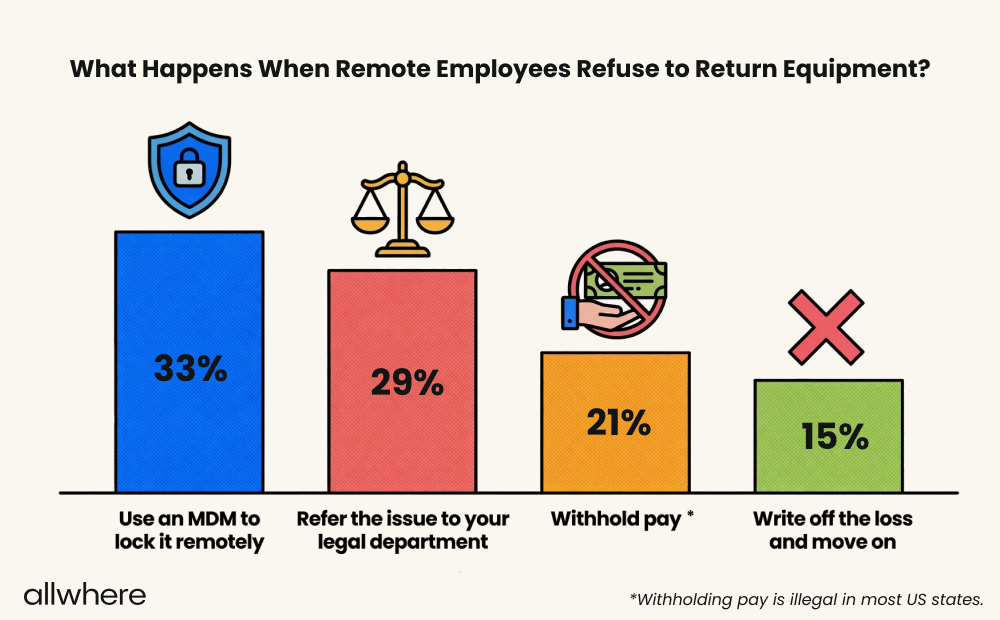
Note that it may sound tempting to withhold pay for the asset. In fact, 21% of survey respondents said this is their course of action. But withholding pay is illegal in most, if not all, US states.
So this isn’t an option we recommend.
Section Takeaway
When remote employees refuse to return company equipment during offboarding, using an MDM to lock the device remotely was the most common response. Surprisingly, 21% of companies withhold pay, despite the questionable legality of that behavior.
3. Choose Service Vendors
One of the biggest decisions an organization has to make is how they want to procure IT assets. There are three main routes you can take.
- Purchase directly from a manufacturer (39% of companies do this)
- Buy from a retailer like Amazon or Best Buy (27%)
- Go through an IT reseller (34%)
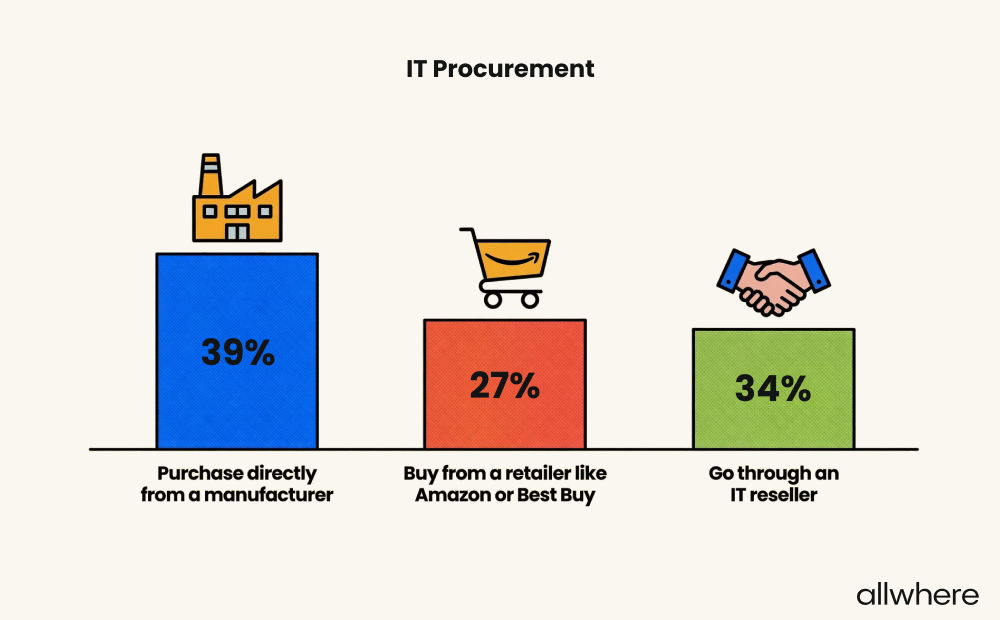
Purchasing directly from a manufacturer or buying from a retailer will likely make sense if you want to be extremely hands-on with the process and don’t mind dealing with logistics, tracking, and communication.
However, if you don’t have the time or simply don’t want to be bothered by the often meticulous nature of these tasks, then using professional IT asset management services, like allwhere, is usually your best move.
As we mentioned earlier, 37% of survey respondents spend 21+ hours on this per week, which can be a huge time drain.
With allwhere, we partner with today’s top vendors and handle all of the logistics and communication, for a completely hands-off experience, all while letting you track your IT assets from one convenient platform.
Beyond cost, I tell all my clients: standardize your hardware models. If your marketers use Dell and your devs use Lenovo, your IT team will spend hours trying to find the right parts. We reduced one client's laptop models from five to two. Their repair time fell by nearly a week.
And always vet your vendor's post-sale support. A warranty is useless if you can't get someone to answer the phone.
Philip Stoelman
Founder & CEO of Network Republic, IT Reseller
The other part of the equation is deciding where you’ll store unused devices when they haven’t yet been assigned to an employee.
Our survey found that 67% of organizations store them at a company office, 11% store them at their IT person’s home, and 22% store them at a third-party facility.
If you have the storage space and adequate security measures (e.g., access control and video surveillance) in place, a company office may be sufficient.
Otherwise, if you lack storage, don’t have sufficient security, or simply don’t want the logistics hassle, storing IT assets at a third-party facility can be a smart move.
In fact, this has become increasingly popular in recent years, especially for organizations with a heavy remote or hybrid workforce.
So to recap, at the very least, you’ll need to decide where to buy equipment from, which shipping carrier to use, and where you’ll store your IT assets.
Note that hiring a full-service IT asset management company like allwhere offers the framework to do all of this for you.
Section Takeaway
IT procurement preferences vary quite a bit. 39% of IT companies purchase directly from the manufacturer, 34% go through an IT reseller, and 27% buy from a retailer.
4. Map Out the Full IT Asset Journey
The typical IT asset lifecycle involves four key stages with a lot of twists and turns along the way. A huge part of staying on top of the asset lifecycle is ensuring you have the entire journey mapped out, start to finish.
While the specifics will vary, here’s what the common IT asset lifecycle looks like for most companies.
- Procurement - IT equipment is purchased
- Deployment - Devices are configured and distributed to employees
- Management - Usage is monitored, upgrades and updates are made, and repairs are performed
- Retrieval - Employees give devices back to be refurbished, recycled, or disposed of
Your goal here is to create a detailed map of every stage throughout the IT asset journey so that you have full visibility, understand your IT investment and ROI, optimize your budgeting, and can better predict future needs.
You can find a detailed overview of how to get started creating a working IT hardware lifecycle here.
When doing so, it’s important to be aware of some common issues that many companies face throughout the lifecycle, with one of the biggest being visibility.
Our survey found that 80% of respondents were very confident in knowing where all company assets are at any given time. However, the remaining 20% were only somewhat confident.
This shows the importance of having a robust tracking feature that shows you the status of devices at all times. allwhere, for example, lets you track all of your assets from a single dashboard, so there’s never any guesswork.
The other two issues involve shipping assets to employees and retrieving them.
More specifically, our survey found that 64% of companies have lost an IT asset during shipment to or from a remote employee.
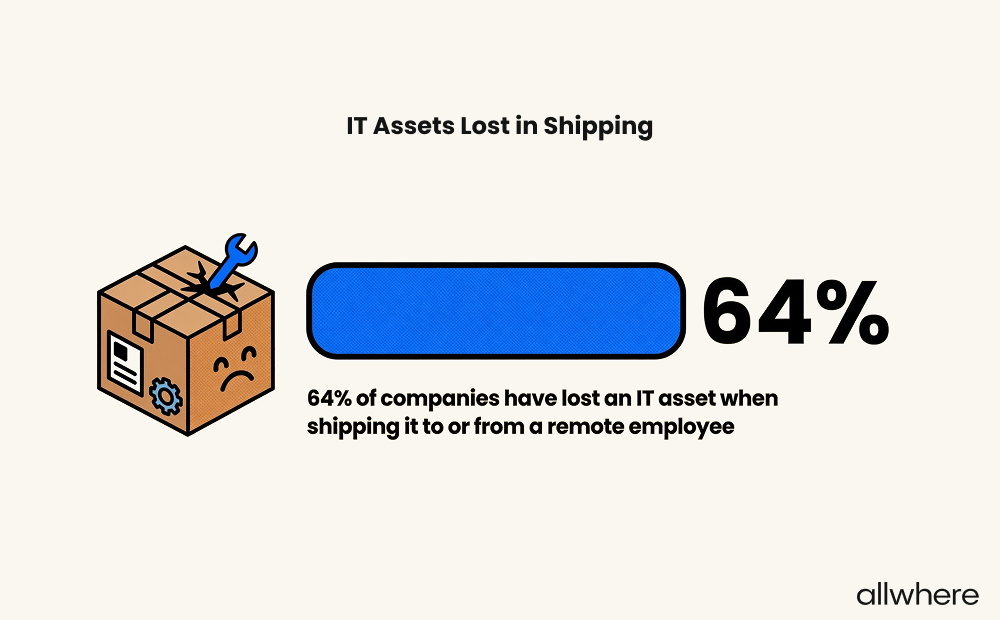
And when it comes to recovering an asset from a departing employee, more than half of the respondents stated that it took one to two weeks, with some saying that it took more than three weeks.
That’s why it’s crucial to get your shipping logistics ironed out and use a reliable carrier or partner with a reliable third-party like allwhere, who will handle the logistics for you.
Section Takeaway
64% of companies have lost an IT asset in shipping at least once. 20% of survey respondents were only somewhat confident they knew where all company assets were at any given time.
Common Challenges in ITAM Implementation
Asset Tracking and Inventory Accuracy Were the Biggest Problems Most Respondents Cited
Our survey respondents identified roughly 100 different challenges in IT asset management.
Here are just a few examples.
- Evaluating vendors
- Finding the right devices
- Updating assets with newer products
- Managing constantly changing legalities
- Keeping track of lost assets
But when we crunched the data, it became clear that two challenges stood out most frequently across the board — asset tracking and inventory accuracy.
In particular, many organizations stated that they struggled with:
- Overall asset tracking complexity
- Tracking assets across locations
- Keeping on top of device updates and software licenses
- Keeping information accurate
- Making sure there are no errors
It should also be noted that international ITAM tends to make this even worse.
With 100% of our survey respondents being located in the US, asset tracking and inventory accuracy can become even more complicated when you’re dealing with different time zones, compliance variations, and global logistics complexities.
Not to mention, cultural differences and communication challenges can also be problematic.
So when you’re implementing ITAM and learning the ropes, it’s important to anticipate asset tracking and inventory accuracy issues and develop a game plan for addressing them.
Equipment Recovery and Offboarding
Another big challenge involves the final stage in the IT management lifecycle, when an employee leaves and devices need to be retrieved.
In fact, some respondents even went so far as to say that coordinating the return of equipment is the most difficult part of IT management.
Here are some survey responses that mention the specific issues modern organizations face.
- Making sure employees return equipment once they are no longer employed with the company
- Tracking assets across locations and recovery during offboarding
- Ensuring assets are recovered on time
- Keeping up with the items that are returned and repurposed (new hire equipment tracking is easy, but upgrades and returned equipment usually cause issues”
Once again, it should be mentioned that 64% of companies have lost at least one IT asset after it was shipped by an employee.
And most companies have a strategy in place if an employee refuses to return equipment during offboarding, with 33% using an MDM to lock it remotely, 29% taking legal action, and 15% simply writing off the loss.
We’ve found that making it easy is the key. When someone leaves, we send them a box with packing materials and a prepaid return label. There’s really no excuse not to send it back.
Out of hundreds of returns, we’ve only had one situation where someone didn’t cooperate, and that was more of a one-off. Most people do the right thing when the process is simple and expectations are clear from the start.
Dr. Brian Jones, PhD
IT Consultant
The bottom line is that this is a pervasive issue, which is why you need to focus on creating a strategy for streamlining equipment recovery and offboarding.
One of the best ways to ensure smooth recovery is to use a professional laptop retrieval service like allwhere, where we ship a retrieval kit with a box, return label, and shipping supplies, and offer real-time tracking until the equipment is returned.
Security, Compliance, and Privacy
After looking at the survey results, it was also apparent that the spectrum of security, compliance, and privacy is an ongoing concern for many organizations.
For perspective, here were some exact challenges cited by participants.
The most difficult part of IT asset management is:
- Ensuring that software is patched and hardware is decommissioned or replaced before it becomes a security risk or a performance bottleneck
- Protecting privacy
- Privacy and security
- Ensuring that information on devices remains secure
- Security and stability while keeping up with user demands
- Ensuring all assets are up-to-date with patches, latest updates, relevant software, and tools that are needed for the job
- Dealing with ever-changing legalities
And while these are concerns for companies across the board, those in heavily regulated industries like finance and healthcare are especially susceptible to these issues.
That’s why it’s critical to create robust IT security policies, control employee access, perform regular audits, and maintain detailed activity logs.
You’ll also want to wipe data when retrieving devices to ensure sensitive information isn’t leaked, and have at least one dedicated team member in place to oversee regulatory compliance.
Other Common ITAM Pain Points
Besides these obstacles, our survey found a wide variety of other challenges among today’s IT people.
One we heard multiple times involved finding quality inventory at a reasonable price and dealing with reputable companies. With so much competition out there, it isn’t always easy to tell which vendors are legitimate and who truly offers the most value.
That’s why it’s important to perform extensive research and consider partnering with a third-party like allwhere, which only procures IT assets from highly respected vendors and has built-in relationships.
Another pain point is getting all employees up to speed on the new changes and software, which speaks to the need for strong onboarding and ongoing staff communication.
It’s also helpful to preconfigure IT assets before distributing them to employees, as they can get up and running with less effort on their end.
Also, many companies get frustrated troubleshooting computer issues and making sure all components are compatible and optimized.
With IT devices constantly evolving and becoming obsolete quicker and quicker, simply ensuring compatibility can feel like a full-time job.
Finally, making long-term decisions can be a source of stress, which is why it’s helpful to implement analytics to identify trends and patterns.
Streamline Asset Management and Control Your Costs with allwhere
Following asset management best practices is essential for any IT infrastructure. But as we’ve learned, it comes with considerable challenges that you must account for.
Data from our survey specifically found that asset tracking, data accuracy, equipment recovery, security, and compliance were some of the biggest challenges.
So it’s crucial that these and any other issues that could be disruptive to your IT network aren’t overlooked.
One of the best ways to streamline IT asset management while simultaneously controlling your costs is with a service management solution like allwhere.
allwhere takes the hassle out of IT asset logistics, offering IT procurement services, shipping, deployment, management, retrieval, and more from one simple dashboard.
We only source from reputable vendors and do all the heavy lifting so you can focus on what’s most important — running your business.
Learn more about allwhere and get started here.
*Methodology
We used Pollfish to conduct a survey of 100 randomly selected IT professionals working full-time in the US. All participants handle IT asset management responsibilities as part of their role. 97% of respondents work at hybrid remote/in-office companies, and 3% work in remote-only companies.
