
![How Often to Replace a Laptop [Based on 2026 data]](https://cdn.prod.website-files.com/637be80ebdeb9e668f7a84dc/6a4e7f04086d7c81a483ab57_how-often-to-replace-a-laptop-allwhere.webp)
Article by

Topics

One platform to manage the entire IT device lifecycle
GET STARTEDAlongside desktops, business laptops are one of the most heavily used IT devices for most companies. So unsurprisingly, they experience a lot of wear and tear, which shortens their lifespan and means they need fairly frequent replacement.
We analyzed thousands of used laptop sales data (the first laptop data study that we’re aware of) and consulted top IT experts.
Below, we’ll go into the details of how long business laptops typically last, how often they need replacement, and much more.
How Long Does a Laptop Last on Average?
As you might imagine, business laptop lifespan can vary and is impacted by multiple factors, which we’ll explore later.
But most experts place the average lifespan at three to five years, with 3.7 years being the average.

"Gartner estimates the average enterprise laptop lifespan at approximately 3.7 years (with desktops around 4.6 years), and many organizations align replacements within a 3-5 year window to match support cycles as well as performance and security needs. As an MSP, we recommend a staggered three year refresh cycle for most organizations to ensure machines remain under warranty, maintain strong performance, and avoid rising maintenance costs." explains Dave Hatter, IT and cybersecurity expert.
We’ll dive deeper into replacement frequency shortly.
This guideline is corroborated when you look at the typical annual depreciation rate you can expect from laptops across the board. To find this data, we pooled the median retained value of MSRP by laptop age across thousands of eBay sold listings.
Here’s what we found.
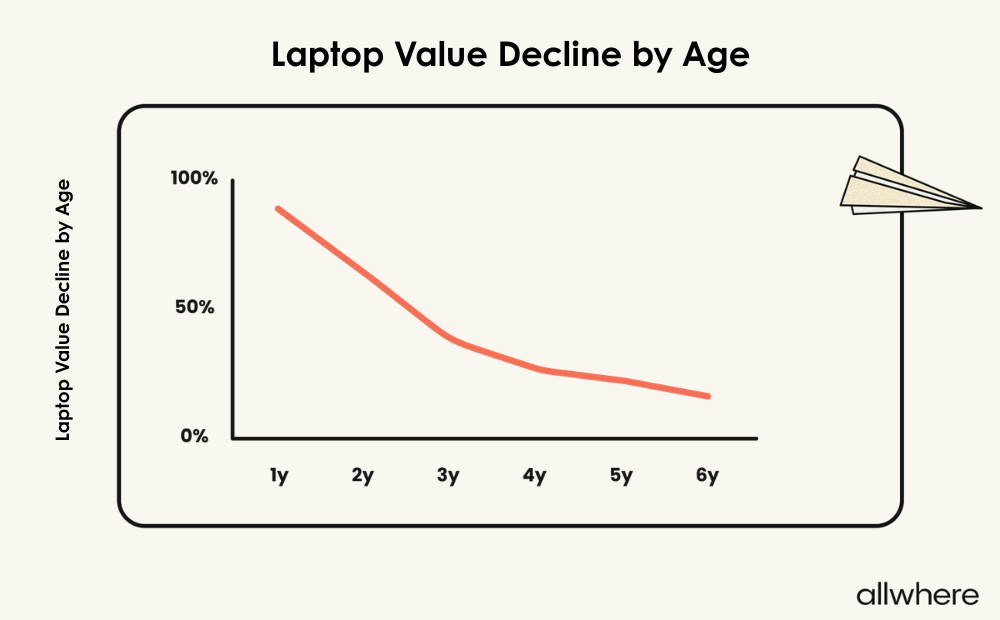
By these numbers, there’s just over a 10% drop in year one, then a much steeper drop from years two and three, for a total of 60.8% after the three-year mark.
This is then followed by a gradual decline in subsequent years.
While there are certainly cases where businesses can push an old laptop beyond five years, that’s when you get to the point where performance, compatibility, security, and productivity start to become an issue.
This is especially true if you have employees who run modern software, which often has more demands than what older hardware can comfortably provide.
The bottom line is that, in most cases, it’s not realistic to expect a business laptops life to extend beyond five years. This brings us to our next point regarding older laptops.
How Often Should Businesses Replace Laptops?
"Laptops should be replaced roughly every 3-5 years,” explains Mark Friend, Company Director at Classroom365, an IT company for schools. “Whether a 3-5 year replacement cycle is the right number of years really depends on how the laptop is used."
“Some companies think that three years is the standard timeframe for all laptops and replace any that are three years or older, regardless of actual performance or age. Schools have found that when laptops are used less aggressively, they can perform well past the three-year mark.
One of the first indicators of laptop issues is battery health, which degrades quicker than average between the two-year and three-year marks.
In addition, extensive use of a laptop, such as running several programs and managing several tabs with connected monitors, leads to a rapid increase in laptop degradation.
Laptops become slower to open programs, save files, and complete general functions over time as the end of life approaches. These lost minutes, multiplied across a team of people, can add up to hundreds of lost hours every week.
The additional cost of repairs over time continues to add up and reach a point where the total repair cost exceeds the cost of a new laptop.”
Hugh Caldwell, CEO of Texaport, an IT managed service provider, shares the same view as Mark Friend.
“For most businesses, the right answer is a three-year cycle, and there are two reasons worth understanding,” Caldwell notes.
"The first is technical: that’s about how long a laptop stays fast, reliable, and properly supported with security updates. The second, and the one people tend to underrate, is budgeting.”
“A fixed cycle makes hardware spending predictable, because you know in advance when each device is due for replacement and can budget for it accordingly. This means replacements can be planned ahead rather than handled reactively when a device fails.
That said, three years is a guideline rather than a hard rule. Some businesses and non-profits have IT budgets that won’t stretch to that pace and would rather get more out of each device, and in practice, some of our clients run theirs for five years.”
The bottom line is that three years is usually ideal for laptop replacement and five years is the max.
Although you could potentially push it longer, especially if it’s a high-quality new laptop, you need to be cognizant of hardware and operating system performance, as well as security, compliance, and overall productivity.
Also, if you find yourself in the situation where you need to make ongoing repairs to a device due to frequent crashes or hardware failure, the disruptions to operations may outweigh the benefit of keeping an existing laptop rather than buying a new one.
But let’s get more specific.
If you’re talking about a PC laptop that has high-demand requirements — say, for example, you do frequent video editing or use a gaming laptop for specialized tasks — you’ll likely want to replace a laptop after three years.
However, if you have lighter requirements, where employees simply check email, do some web browsing, and use Microsoft Office, you could likely extend that time to four or five years before getting a new computer.
This is especially true if you follow maintenance best practices, make automatic OS updates, ensure timely security updates, and optimize battery usage.
With this approach, you can be proactive about laptop replacement and often initiate refreshes before hardware failures or security issues occur.
Factors That Affect How Long a Laptop Lasts
First, there’s laptop quality. Generally speaking, a higher-quality device like an Apple MacBook or a Lenovo ThinkPad will last longer than most budget laptops.
Higher-end laptops like these are built with higher-quality components, tend to have better cooling systems, and generally have more durability than lower-end laptops. Therefore, you can expect to get a longer lifespan out of them.
The same is true for many gaming laptops that have a lot of storage drive and hard drive.
For a better idea of how different laptop brands stack up against one another, here’s the retained value by age from one to six years of use from four of today’s top brands.
And here’s a graph of that data visualized.

Next, there’s laptop usage. If a device receives intensive usage day in and day out, this puts greater strain on its components and storage systems, which will likely reduce its lifespan.
Conversely, if a laptop receives much lighter usage for basic tasks and isn’t consistently put through its paces, it should last longer.
Third, there’s the employee role. Say, for example, two employees use the same Windows laptop model.
One employee has a laptop-intensive role like a developer, while the other employee uses it less frequently, for a role like a sales rep. Odds are, the sales rep’s laptop will last longer than the developer's, as it’s not being used nearly as frequently.
Fourth, there’s the environment. For employees who work remotely and travel frequently, their laptops may wear out more quickly because of wear and tear, especially if they’re in hot, humid environments.
However, for employees who work in-house or from home, where their laptops stay in one place with a controlled environment, the lifespan should be longer.
Finally, the overall level of care and maintenance will impact longevity and will likely lengthen the time before a laptop replacement is necessary.
Repair vs. Replace: How to Decide
Let’s say you have a laptop that’s experiencing problems, but you’re not sure if laptop repair or replacement is the right move. There are three main things to consider when making your decision.
- Laptop age
- Number of previous issues
- The amount of downtime it’s creating
When it comes to laptop age, it usually makes more financial sense to repair new laptops rather than replacing them.
That’s because you’re likely to spend significantly less on something like a laptop battery replacement, keyboard replacement, SSD replacement, or a screen replacement for a cracked screen.
Generally speaking, making repairs on laptops that are less than three years old has a good ROI. And, in many cases, investing in a RAM upgrade or SSD upgrade can increase your length of realistic usability.
If you’re dealing with a laptop that has had zero or only minor issues with minimal downtime up until this point, computer repair is almost guaranteed to be the right move.
On the other hand, let’s say that you have a laptop that’s over three years old, has shown signs of decreasing performance, has had previous hardware issues in the past, or some combination of the three.
In this case, laptop replacement is likely the smarter choice. That’s because it’s hard to justify repairing a laptop in this state, as there will probably be a considerable replacement cost and you’re likely just delaying an inevitable replacement.
When in doubt, ask yourself if the repair cost will be 50% or more of a replacement. If so, a replacement is usually in order and part of IT asset management best practices.
How to Build a Smart Laptop Replacement Strategy
Regardless of how many laptops your company uses, it’s critical that you:
- Have full visibility of all devices
- Know which employees have what, along with device location
- Maintain accurate inventory
- Keep detailed records of each laptop purchase date, software updates, hardware updates, and maintenance
- Monitor the health of all devices
Also, you need efficient processes that allow you to seamlessly procure, deploy, manage, store, and retrieve laptops when they need to be decommissioned.
And all this requires having the right laptop replacement strategy in place. Perhaps the easiest way to accomplish this is by partnering with a third-party expert like allwhere.
At allwhere, we offer comprehensive IT asset lifecycle management where we take care of everything — procurement, deployment, management, storage, and retrieval — for a completely hands-off experience.
Laptop lifecycle management features include replacement alerts, sell vs. recycle recommendations, and device management tracking.
We handle vendor and employee communication, logistics, shipping, and more, so you’re free to focus on core business operations for increased productivity. All the while, you can track everything from one convenient platform.
We ship to over 48 countries for hassle-free international fulfillment. And because we have a robust list of reputable laptop vendors, this allows for rapid fulfillment, where you get exactly what you need without any hiccups.
You can learn about our entire process here.
Perfecting Your Laptop Refresh Cycle
With laptops having a fairly short lifespan, figuring out how often to replace them is an essential part of optimizing the IT asset lifecycle. Sticking with a three- to five-year refresh cycle should work well for most companies.
While this may sound straightforward on paper, executing it consistently across a growing or distributed workforce comes with significant challenges.
If you’re looking to simplify and streamline the refresh cycle, allwhere’s asset lifecycle management platform can be a tremendous help.
allwhere automates refresh planning, procurement, deployment, retrieval, replacement alerts, and end-of-life decisions to make the recommended refresh cycle actually achievable for IT teams.
Learn more about allwhere’s capabilities here.
