
Article by

Topics

One platform to manage the entire IT device lifecycle
GET STARTEDHaving a system for obtaining PCs along with the right hardware, management, and support is a must for most modern businesses. And a popular way for companies to go about this is to partner with a PCaaS vendor.
But before going this route, it’s important to see the big picture and the potential downsides of using a PCaaS solution.
What is PCaaS (PC as a Service)?
With this arrangement, organizations use a PCaaS provider to lease equipment like desktops, laptops, and other endpoints through a subscription model.
Often, a PCaaS offering also includes bundling, allowing a business to get device configuration, PC deployment, managed services, warranties, security, and support under one umbrella so they don’t have to deal with multiple vendors in the service market.
Rather than having to procure, deploy, configure, and manage this aspect of IT themselves, PCaaS allows organizations to sign a contract where they pay a recurring monthly fee to obtain the PC equipment they need for a given time period.
Once the contract ends — typically between two to four years — the equipment is then returned, where businesses can choose to upgrade and enter into a new PCaaS contract if they wish.
At first glance, this model may seem to offer nothing but benefits.
After all, organizations don’t have to pay the entire cost of devices up front, which means they can avoid any major expenditures right off the bat. This can be especially appealing for new or smaller businesses that are seeking digital transformation but have a limited budget.
And because a PCaaS handles equipment logistics end-to-end, this creates a lot of operational efficiency, which can be quite attractive.
That said, there are some significant downsides that companies should be aware of before getting into the global PCaaS market. More on that later.
How PCaaS Works: The Subscription Hardware Model
Though there can be some variation in the specific steps, it typically looks something like this.
First, you select the devices you want from a vendor’s pre-approved catalog. For instance, they may offer a handful of laptops from Dell Technologies or HP Inc, or desktops from Lenovo or Apple.
Next, the provider will take care of device configuration, where they may install an operating system, software, and artificial intelligence, as well as security measures to secure websites so that it’s ready to go out of the box, and employees can swiftly begin onboarding.
Third, there’s device deployment, where a vendor sends hardware to your employees.
From there, a PCaaS partner will provide ongoing support for each device to accommodate your business needs. This can include troubleshooting, repairs, upgrades, and replacements on an as-needed basis.
Finally, they will either A) initiate a device refresh once you reach the end of your contract (if you’ve agreed to continue service) or B) initiate a return if you choose not to renew your contract. Note that if any equipment is damaged or lost, you’ll likely encounter fees.
The Hidden Costs of PCaaS Over Time
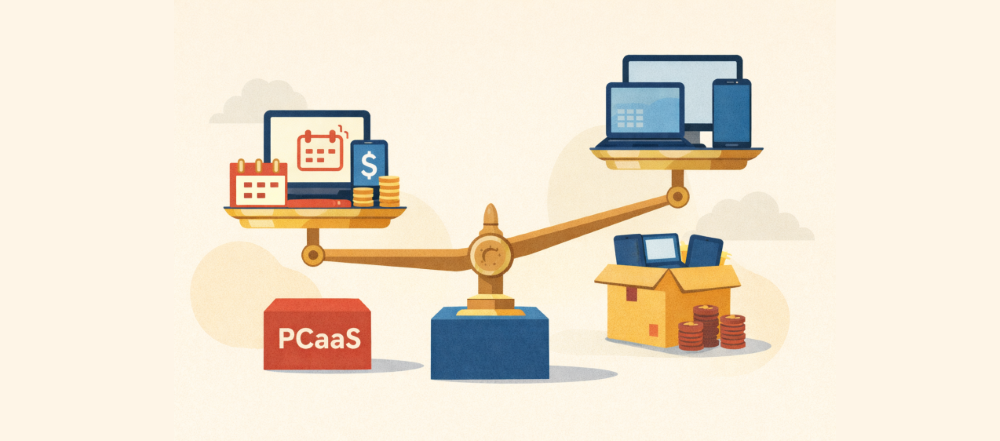
On paper, this arrangement can seem appealing to many organizations, mainly because of the simplicity and lack of initial investment. But as we mentioned earlier, there are some significant cons to be aware of before getting locked into a contract, with the biggest being long-term cost.
For starters, you’ll often pay more for devices in the long run with PCaaS when compared to buying them on your own at retail price. That’s because most providers charge a premium for their service, and the numbers add up over time.
We’ll provide some specific numbers toward the end of this post.
So while you certainly get convenience with PCaaS, you’re likely to pay more for hardware because of it.
Another issue involves the mandatory refresh cycles. Because many vendors require a periodic equipment refresh every two to four years, you’re stuck paying for it whether you need it or not.
And with many devices easily lasting beyond four years, this can become an unnecessary expense.
There’s also the potential for early termination fees if you end up returning equipment early.
Say, for instance, there’s unforeseen downsizing, and you need to unload hardware. With a PCaaS model, you’ll likely be penalized, whereas you could simply resell those devices on a secondary market if you bought them outright.
And as we touched on earlier, damages during return — even something relatively minor like cosmetic wear — can potentially result in fees, which in some cases, may be excessive.
This isn’t to say that you can’t get a favorable ROI with PCaaS, but it’s important to be aware of the overall cost that often comes with it.
Vendor Lock-In and Limited Flexibility with PCaaS
Another big drawback is that once you’ve signed a contract with a PCaaS provider, you’re stuck with them until it ends — something that can be detrimental to your business’s flexibility and scalability.
Again, whenever you choose a service PCaaS, you’re limited to a finite catalog of pre-approved devices. So if, for instance, you want a specific type of personal computer from someone like Dell PC, you may not be able to get it.
Or, if you want to mix manufacturers like Dell, Apple, and Lenovo, you’re likely to encounter friction there as well, which many organizations find frustrating.
Another situation where problems can arise is if you need to rapidly scale up or down. Because you’re locked into a contract, this can limit your ability to quickly acquire the new assets you need, which can potentially hinder business growth.
Conversely, if you ever need to quickly downsize for whatever reason, you’ll likely be stuck paying for hardware that you don’t need.
Not to mention, you never actually own any of your hardware, which means you have zero asset equity. So if you don’t wish to renew the contract, you have to return the devices at the end, and there’s no resale value.
Why Ownership Beats Subscription for IT Hardware
While it’s true that customers typically pay less initially with a PCaaS solution, long-term, the costs often end up being considerably more.
That’s because with ownership, you can use a device for the entirety of its lifespan, rather than being forced into a mandatory refresh every few years.
Besides that, when you own equipment, you can resell aging devices on a secondary market once you’re done with them. As long as devices or individual parts are still usable, this can bring in additional money that you can reinvest into IT equipment or general business operations.
That way, you can recoup part of your expenses and maximize your overall investment. With PCaaS, on the other hand, you essentially have nothing to show once the contract is over.
Another key benefit of ownership is that you have complete control over the vendors and hardware you purchase. Rather than being stuck with limited PC manufacturers, for example, or being unable to mix and match devices, you’re free to choose the exact lineup you want.
There’s also the advantage of added flexibility. If you need to scale up or down, ownership allows you to make the necessary changes without unnecessary friction.
Not to mention, you don’t have to worry about any fees or penalties for added peace of mind.
How Modern IT Procurement Services Deliver PCaaS Benefits Without the Downsides
If you’re looking to streamline hardware procurement and much of the overall asset lifecycle, a great alternative to PCaaS is IT procurement services.
With allwhere, for example, you can tap into our large network of vendors to find the exact equipment you need to meet your company’s unique specifications.
Because we partner with multiple reputable vendors, you’re never limited to a single vendor’s inventory, which gives you plenty of selection so you can build a fully customized hardware lineup.
And if one supplier doesn’t carry the equipment you want or is out of stock, there are no worries because we can find an alternative source for quick, hassle-free IT procurement solutions.
Because you’re not leasing equipment as you do in the service PCaaS market, once you buy hardware, you’re the owner. That way, you’re free to use it for the entirety of its lifespan, and you can resell old devices once you’re done with them.
And besides just handling procurement, allwhere offers a lot more and can effectively manage your entire IT hardware lifecycle for you.
For instance, we also take care of device configuration, where we install an OS, software, apps, and security to protect sensitive information.
We handle device deployment while offering detailed tracking every step of the way.
We offer convenient, streamlined inventory management, where you have a detailed overview of all of the equipment you own and can see which employees have what, and what the location of each device is.
And when it’s time for a recovery or device disposal, we can take care of that as well, while handling all of the logistical complexities for a completely hands-off experience.
Also, note that we specialize in serving remote and hybrid work environments and cater to companies all around the world in 48 countries.
So you’re by no means limited to just the United States.
Total Cost Analysis: PCaaS vs. Direct Procurement with Asset Management
To better understand how PCaaS compares with buying devices on your own, here’s a hypothetical total cost analysis over three years if you procured 100 laptops at $1,200 each.
With the PCaaS approach and the typical device costing $50 a month, you would pay:
- $60,000 the first year
- $60,000 the second year
- $60,000 the third year
After the three-year contract ended, you would have paid a total of $180,000 and wouldn’t own anything.
On the other hand, with allwhere procurement and management, you would pay:
- $120,000 for the initial procurement and $6,000 for management the first year
- $6,000 for management the second year
- $6,000 for management the third year
At the end of the three years, you would have paid a total of $138,000 with around $40,000 in resalable assets. So when you subtract $138,000 from $180,000, you would see $42,000 in savings with direct procurement.
And when you throw in the additional $40,000 in resalable assets, you would see a total savings of $82,000. When you look at it like this, it’s easy to see why many companies consider direct procurement to be part of IT asset management best practices.
Final Thoughts
It’s understandable why a PCaaS offering looks good on paper. The initial cost is significantly lower, and you can equip your employees with the latest technology with built-in lifecycle management.
But when you zoom out and look at the big picture, it’s clear that PCaaS has some major drawbacks, and for many businesses, direct procurement is the more logical option.
To learn more about how allwhere can simplify and streamline your IT management and logistics, schedule a demo today.
