

Article by

Topics

One platform to manage the entire IT device lifecycle
GET STARTEDEqually important as getting employer equipment like laptops, tablets, and smartphones into the hands of employees when first starting with your company is getting it back after termination.
As part of offboarding, you need to know how to get equipment back from terminated employees efficiently while minimizing disruptions along the way.
If you’re wondering how to approach this process, here’s how to get equipment back from a terminated worker in five simple steps.
1. Document Requirements in Writing
First, you’ll want to create a formal policy outlining the equipment return process so you’re on the same page with employees. Whether you’re dealing with in-house workers, remote workers, or those on a probationary period, this should set the right expectations right from the start.
A policy should clearly state that it’s an employee’s responsibility to return company property, and there should be a specific timeframe (e.g. 7 days) in which they have to do so after leaving.
You should have each new employee read the offboarding process requirements in an employee handbook when they start working at your company and sign an agreement on the employment contract.
Having this in writing is critical as it holds a terminated worker accountable for returning equipment, and there should be no confusion to minimize the potential for issues after termination.
Given that one study found that “71% of HR workers say at least one employee didn’t return company-owned equipment,” this can spare you a lot of stress later on.
2. Clearly Communicate the Process to the Terminated Employee
Shortly before a departing employee leaves, you’ll want to refresh their memory about the agreement on returning company assets and give them a full overview of how to navigate equipment returns after termination.
A simple way to do this is by creating a checklist of what to do, along with step-by-step instructions for the following:
- When to return remote employee equipment
- Where to return it
- How to return it
- Who to reach out to if they have any questions
- Consequences for not returning company equipment on time (e.g loss of a portion of final earnings)
Then, during the exit interview or via email, communicate the process as a reminder and send them the checklist to ensure everything is handled correctly.
Be sure to include a concrete deadline for when work equipment is due and ask that a terminated remote employee contact the appropriate team member if any issues arise.
3. Send Them a Box with a Prepaid Return Label
When dealing with someone like an in-house federal employee or probationary employee, gathering company equipment is pretty straightforward. But when it comes to remote staff, you’ll need someone within your company to handle the asset return logistics.
Our survey found that 84% of today’s companies involve IT personnel in this, 39% involve HR personnel, and 53% involve a direct supervisor.
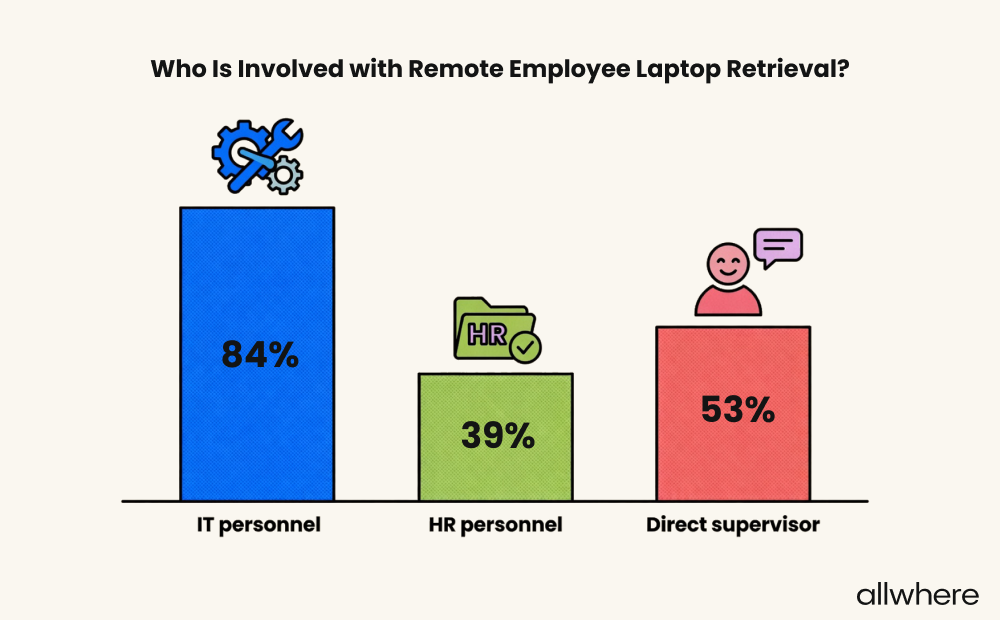
Note that this was a multi-section question, so the survey identified everyone who was involved. Based on this data, it’s clear that IT is the most common department responsible for retrieving IT assets.
One of the best ways to avoid friction and ensure company equipment is returned promptly is to initiate the process by sending a box with a prepaid return label.
This makes it far more convenient for a remote employee and prevents a lot of hassle on their end when returning office equipment. In turn, they can get everything they need and send it back without any guesswork.
They simply pack the box, attach the prepaid return label, and ship it out.
Just note that you’ll want to make sure that you have a clear structure in place for who’s responsible for handling this. For example, it may be your IT department’s job to send out the box and return label and have your HR professionals handle all employee communications.
Also, be aware that many companies choose to use third-party services like allwhere or ReadyCloud IT Asset Retrieval to handle long distance courier logistics and communication to ensure returned equipment arrives safely.
These types of third parties offer several equipment delivery options, including standard shipping, expedited shipping, and in some cases, next day delivery.
4. Follow Up
Ideally, you would reach out to affected employees, send them their box and return label, and they would instantly complete the equipment return process. Unfortunately, it doesn’t always go that smoothly, and it may take multiple reminders to secure an employee asset.
That’s why you should have a follow-up sequence baked into the process. For instance, if you don’t hear back from an employee within 24 hours of the initial communication, you could send a follow-up email or make a phone call.
You could even create an automated email workflow where a series of reminders are sent at scheduled intervals so you don’t have to do it manually.
If someone is unresponsive and doesn’t communicate with company representatives, you’ll likely want to send a formal written reminder.
And if that doesn’t work, it may be time to pursue legal action for unreturned property, such as using a legal courier service to retrieve unreturned employee equipment.
To see what type of legal action can be taken, look for legal advice by researching local labor laws in your area.
Just note that pursuing legal action can be costly and time-consuming. Therefore, it often makes more sense to take the following action instead when dealing with missing equipment.
5. Deduct Employee Pay
If you don’t want to go through the trouble of pursuing legal action, another option is payroll deduction, where you deduct the cost of the company equipment from the employee’s final wages.
This compensation could come through taking a portion of paid leave, vacation pay, or anything else to help you recoup your loss.
While not always ideal, many companies find the deduction of wages to be an easier solution. You’ll likely need to purchase new equipment to replace unreturned equipment, but at least you won’t have to take a financial hit by going this route.
However, before making any deductions from an employee's final paycheck, you need to be sure that it’s allowed under local law. Rules surrounding withholding an exempt employee and exempt employee’s salary can vary widely.
Some states allow employers to use this method if equipment isn’t returned on time. But not all do.
You can find more labor law information regarding final pay deduction from all 50 states, along with contact information, in this resource. There, you can learn more about an unpaid wage for violating company device return from a variety of positions, such as:
- Customer service
- Remote work
- Human services
- Minimum wage workers
- Probationary workers
- Environmental Protection Agency EPA employees
- Federal worker positions
- Department of Government Efficiency workers
- Internal Revenue Service employees
- Those part of the National Treasury Employees Union
Consider Using an Equipment Retrieval Service
Up until this point, all of the recommended steps of IT asset management have involved your business reclaiming company property from a terminated worker.
This can be a good option for many businesses, especially if you have adequate personnel management to handle the process and understand the nuances of final pay deduction in accordance with rules like the Fair Labor Standards Act.
But if you lack the manpower or simply don’t want to deal with the logistics and back-and-forthing required with reclaiming remote employee devices, you can always outsource it by using an asset retrieval service.
With this approach, a third party will handle most or all of the process for you.
And given the amount of time that many companies spend on ITAM, this can be a great choice.
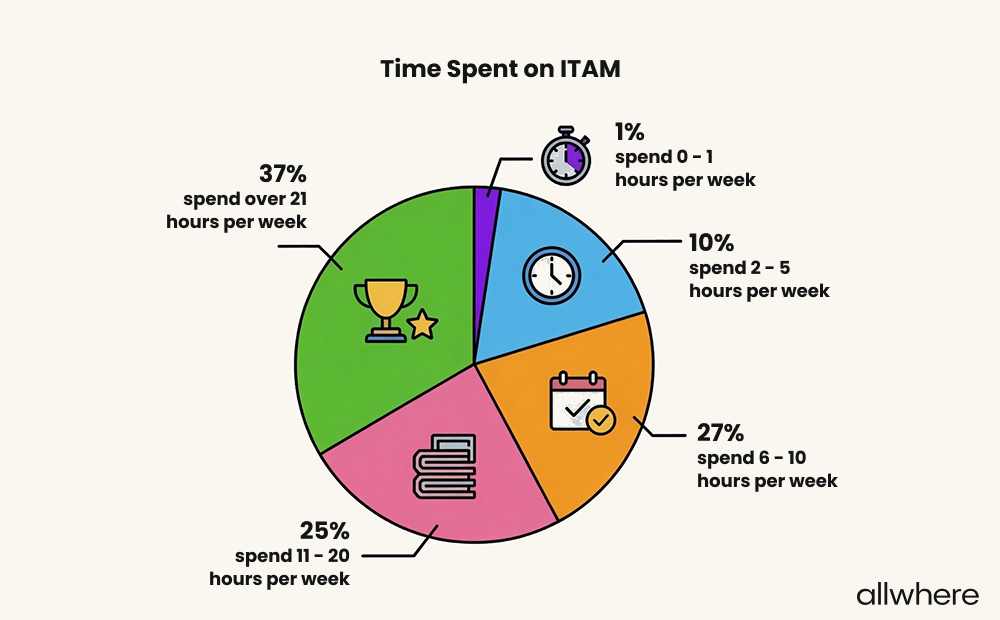
For perspective, 37% of companies spend over 21 hours per week on ITAM tasks, 25% spend 11 - 20 hours, and 27% spend 6 - 10 hours. Conversely, only 11% of companies spend five hours or less per week on ITAM.
If you’d like to get more insightful data points about the current state of ITAM, along with today’s best practices, check out our IT Asset Management Best Practices Survey.
As for specific third-party providers, allwhere offers a great example of an employee laptop retrieval service that makes it fast and easy, while covering logistics end-to-end.
Everything an employee needs to return their laptop is included in a box. There are packing materials, instructions, and a prepaid return label. All they have to do is put in their laptop and accessories and ship the box.
allwhere provides real-time tracking and updates every step of the way from the moment an employee laptop is sent out to the moment it’s delivered. We even handle communication and can send reminders to a remote worker if they fail to respond initially.
And to ensure a high level of security, we also take care of data wiping to protect sensitive company information throughout the process.
You can use a one-time retrieval kit. Or if you need ongoing retrievals, there are bulk options, which work well for larger companies with over 100 employees.
In most cases, US-based businesses will see a retrieval time of less than a week. But if you need it quicker, we can provide you with a custom quote based on your service area.
Learn more about our equipment retrieval service and get the full details here.
