

Article by

Topics

One platform to manage the entire IT device lifecycle
GET STARTEDTracking IT assets and promptly resolving issues are essential parts of asset lifecycle management.
Whether it’s desktops, laptops, tablets, or any other devices, you need a strong framework for addressing problems and maintaining an accurate ITSM history.
The simplest way to achieve this is to build an effective IT ticketing system and asset management process that covers all the bases.
What is an IT Ticketing System?
An IT ticketing system consists of software used to create, organize, and track things like IT incidents, service requests, and maintenance requests from start to finish.
We’ll get into the details of the types of ITSM tickets later, but some common examples can include application crashes, service outages, login problems, and malfunctioning devices.
Ticketing systems like Jira Service Management and ServiceNow use workflows that look something like this.
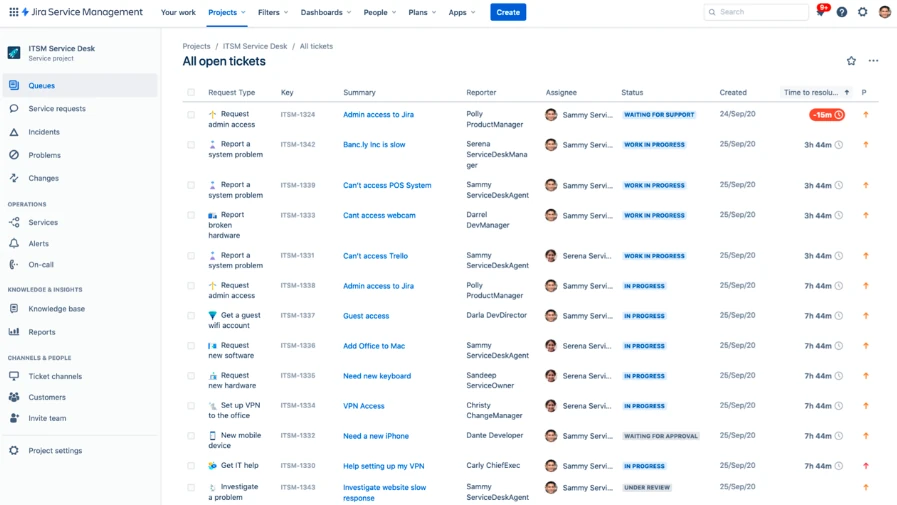
Source: DevDynamics
First, an employee creates a ticket that includes information like their name, the nature of the incident, the problem they’re experiencing, and the device, software, or service that’s affected.
Next, the ticketing system or a team member will categorize the issue by attaching a label and prioritize it by importance (low, medium, or high).
From there, ticketing systems will use automation to assign the incident to the appropriate technician or department to initiate support.
And once it’s been resolved, the ticket will be updated, along with relevant information on the resolution, so there’s an accurate record of everything that’s transpired for transparent ITSM.
Along the way, updates are made at every stage of ticketing workflows so there’s a clear overview of what’s happening and how far along an issue is from being resolved.
Having this level of visibility within ticketing systems is critical for building a cohesive knowledge base and for service management, especially for companies with a large number of ITSM requests.
And key features like ticket routing ensure the right technician handles support, while SLA tracking ensures tasks are completed within the agreed-upon timeframe for greater customer satisfaction.
Using a ticketing system like Jira Service Management or ServiceNow for problem management is helpful because it streamlines the support ITSM process.
Rather than relying on emails, phone calls, spreadsheets, or messaging across different platforms, Jira Service Management and ServiceNow offer a unified ticketing tool that provides a detailed record of support history.
That way, there’s no information siloing, and everyone within an organization has access to a single ITSM knowledge base.
In turn, this greatly optimizes knowledge management, and over time, this knowledge base can improve customer support by helping technicians resolve issues faster.
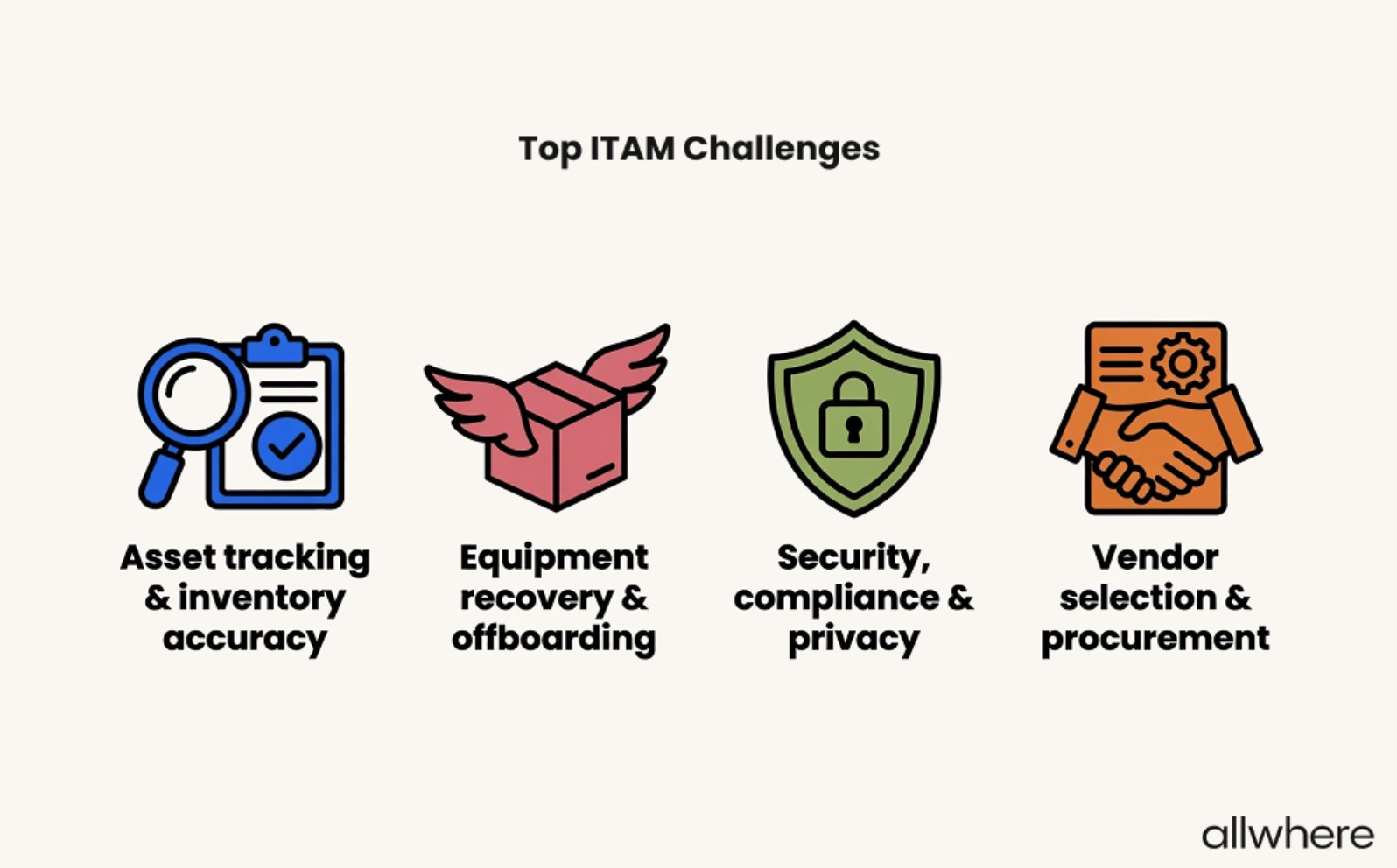
And given that asset tracking and inventory accuracy are the number-one ITAM challenges among today’s companies, ticketing systems, especially those that are automation-centric, can be a valuable resource.
Tracking and Resolving Maintenance Tickets in EAM Systems
When it comes to large enterprise companies with a high volume of IT assets, proactive maintenance is a critical part of asset lifecycle management.
Laptops are a classic example. According to our research here at allwhere, the average business laptop lasts 3 - 5 years...

…and there’s a significant drop in laptop value over that period.
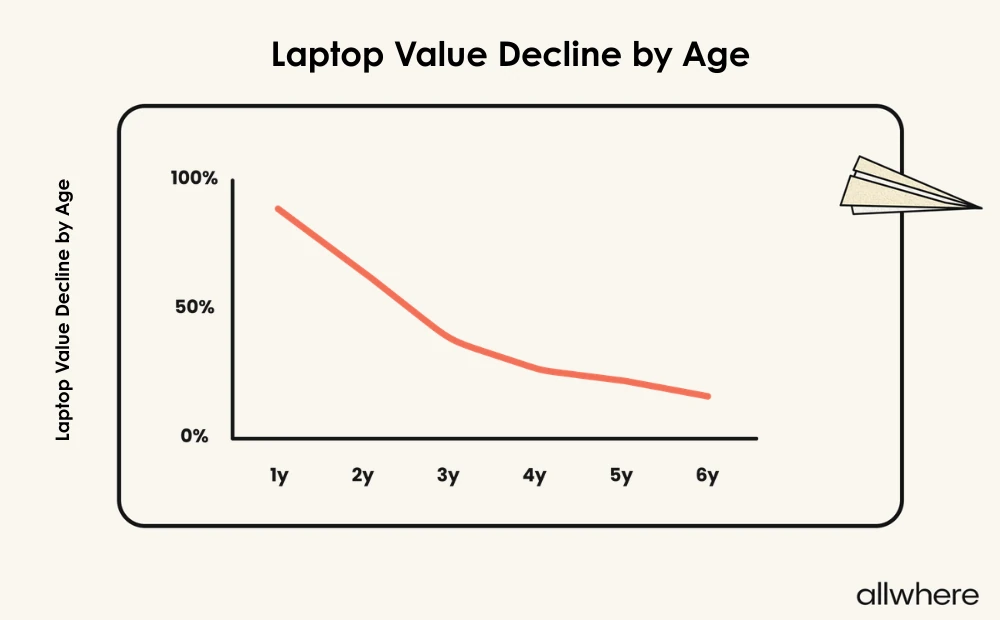
During that time, maintenance tasks like OS updates, battery health tracking, and security management are vital for keeping a laptop running smoothly, maximizing its lifespan, and meeting security/compliance standards.
Using ticketing systems in EAM plays an integral role in optimizing these tasks so that enterprise organizations can stay on top of their equipment and get more out of them, while also creating a better employee experience.
After all, better asset maintenance usually means fewer disruptions and less downtime, so employees can focus more intently on their day-to-day tasks rather than battling technology.
In terms of the specifics involved with maintenance support, it typically involves creating a ticket with the asset ID, owner, and location, along with the issue, severity, required parts, and maintenance history.
Then, the issue moves to the correct technician for a resolution, with all progress updates being recorded along the way, often through automation features.
Ticketing systems like ManageEngine ServiceDesk provide a centralized resource where every form of maintenance can be accurately tracked and recorded to prevent communication gaps and keep IT assets running as smoothly as possible.
This is an integral part of service management because it connects team members to centralized workflows, and ticket routing via automation helps get requests to the right technician without manual intervention.
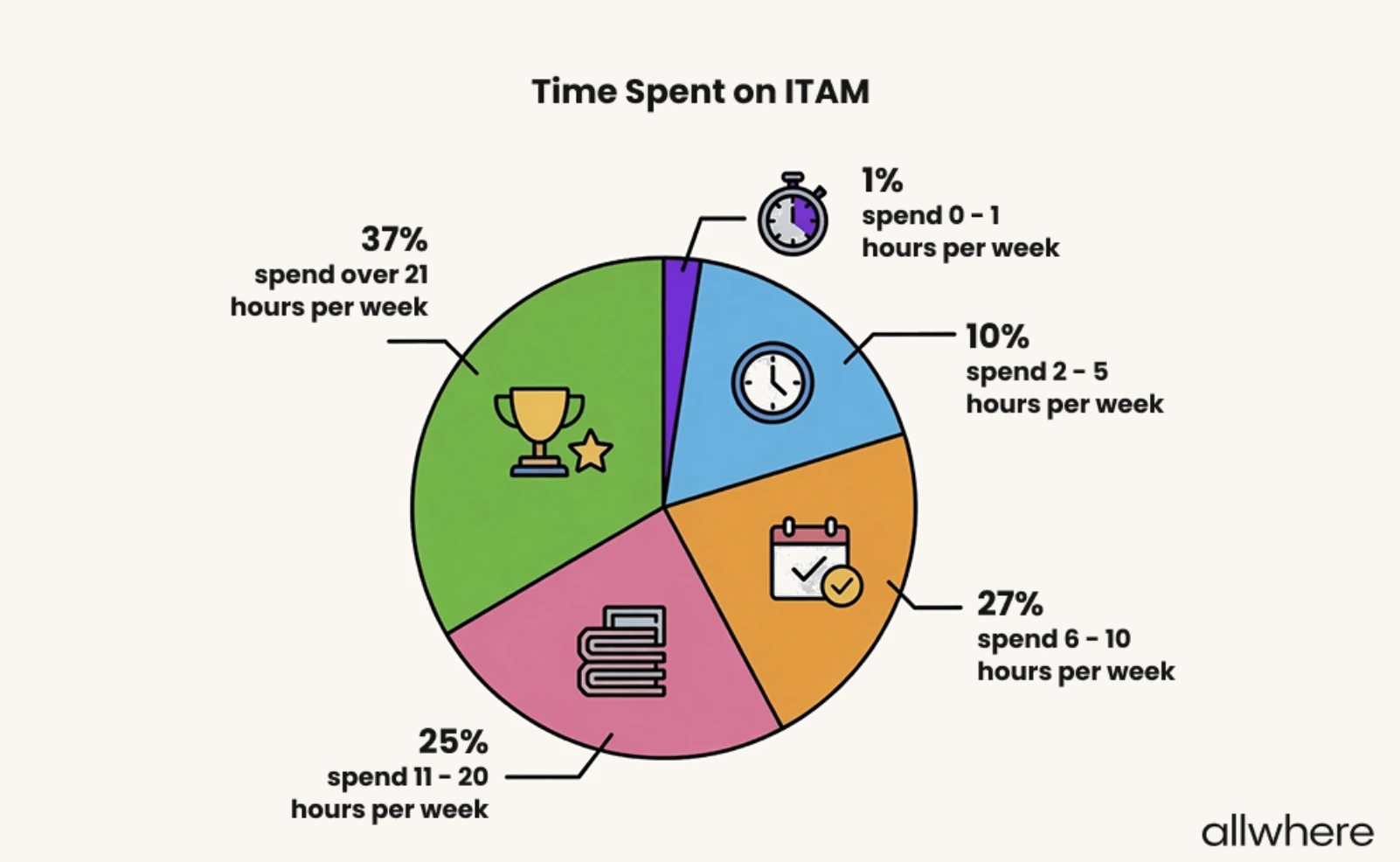
And because 62% of companies spend at least 11 hours per week on ITAM tasks, this can be a big time saver, especially for organizations with a high ticket volume.
3 Key Advantages of Effective Ticket Management
1. Fast, Efficient Incident Resolution
Time is of the essence with each service desk request. With ticket management through a platform like ManageEngine ServiceDesk, you have a highly streamlined, standardized system in place that allows you to receive requests and swiftly move toward a resolution.
By using intelligent ITSM workflows, you can go from having an issue like a login problem or a malfunctioning device to putting it in the rearview with no wasted motion.
With incident categorization, prioritization, and tracking — along with automation and generative AI in many areas — you can diagnose what’s wrong and fix it without your employees or technicians spending any more time than necessary.
In turn, this goes a long way in reducing your administrative burden while operating from a single point of truth with your service desk and customer support.
2. Greater Accountability
From the moment a ticket is created on ticketing systems to when a resolution is finalized, every action is recorded along the way on a tool like ManageEngine ServiceDesk.
This is important because 1) it establishes clear ownership where everyone knows what they’re responsible for during task management and 2) critical tasks aren’t forgotten due to a communication breakdown or internal confusion.
If, for example, it takes longer than expected to fix an app that’s crashed, an IT manager could look into it and see what the problem is. That way, issues aren’t left lingering, and your IT team always knows each ticket’s status.
And if there’s a pattern where a particular team member isn’t meeting expectations as outlined in an SLA, an IT leader could use SLA management to identify the issue and suggest how to improve their performance.
3. Better Visibility
As we’ve mentioned before, an IT ticketing system gives your organization a single point of truth, where you can track every single ITSM ticket end-to-end.
This is incredibly helpful because it allows you to zoom out and see everything that’s happening at any point in time, how many tickets are open, and which technicians are working on resolutions.
And over time, you can identify both macro and micro patterns in your IT asset management lifecycle so you know your ITSM strengths and weaknesses.
That way, you can go after the low-hanging fruit first and work your way through smaller inefficiencies to turn your asset management lifecycle into a well-oiled machine.
4 Types of Tickets
1. Incident Tickets
This refers to anything that disrupts or stops an employee from being able to perform job tasks. We mentioned some examples earlier, like application crashes, AI agent issues, login problems, and malfunctioning devices.
The goal with incident tickets is to quickly resolve the issue to restore hardware, software, or cloud tools to normal functioning, while recording the steps that were taken along the way.
2. Service Request Tickets
For this type of ticket, nothing is broken per se, but a team member asks your IT department to provide something.
For example, an employee’s current OS may be outdated, and they request an update to the newest version. Or, say they believe that their password may have been compromised and they request to have it reset.
Here, organizations will use streamlined workflows and automation to expedite this process and quickly get an employee what they need through ticketing systems.
3. Problem Tickets
This type of ticketing zooms out and addresses ITSM issues that happen at scale.
Say, for instance, an enterprise company has 25 employees report the same software application crashing on a single day. The IT department would quickly know that this is a widespread problem, diagnose potential causes, and seek to deliver a timely solution.
In turn, it would be easier to determine the root cause to drastically reduce the odds of it happening again.
4. Maintenance Tickets
We touched on the basics of this earlier, but maintenance ticketing refers to any type of request that involves repairing or servicing assets to ensure proper maintenance.
In some cases, a maintenance ticket could be preventative, such as requesting a laptop battery to be replaced before it dies.
Other times, it’s reactive, such as when a laptop is overheating and a fan needs to be replaced.
This type of ticketing is helpful because it can prolong the collective lifespan of IT assets, provide a cohesive repair history, and provide big-picture insights.
Note that maintenance tickets can be especially challenging when you’re dealing with remote employees because IT teams can’t physically access devices.
But with allwhere, you can seamlessly retrieve malfunctioning equipment and ship replacement equipment to employees without skipping a beat to drastically reduce downtime.
We simply send a retrieval kit with everything your employee needs to make a hassle-free return and provide updates along the way, while also handling employee communication on your behalf.
Proven Strategies for Effective Ticket Management
Start by laying down the groundwork to keep everyone on the same page and make your ticketing system hyper-efficient.
This can include setting clear goals for ticket management, establishing clear project management and change management guidelines, standardizing procedures, assigning responsibility for ticketing and asset management tasks, and determining priority levels.
Next, we suggest figuring out what specific information to include on tickets.
Here are some examples:
- Asset ID
- Employee name
- Employee location
- Device type
- Error type
- Previous errors
The goal here is to have the optimal amount of information so that it’s genuinely useful and helps expedite the support process, but without including too much to the point that it becomes extraneous.
We also recommend using automation as much as possible in your ticketing systems, as automation can go a long way in reducing redundant, manual tasks.
Say, for example, you have a handful of routine tasks that are cut and dry. You could use IT ticketing system automation to automatically categorize those tasks and send them to the correct department without human intervention.
Also, automation notifications help keep things moving during the support process without team members needing to constantly check emails and messaging platforms.
And if software offers AI features for ticketing systems, like agentic AI for ticket routing, service desk support, customer support, and customer service, this is worth looking into, as this can streamline tasks even more.
Finally, it’s important to keep tabs on big picture metrics like frequent issues, ticket volume, and average response time to identify areas of your workflows and overall IT infrastructure that could use improvement.
How to Track and Manage Your Assets
Again, visibility is a critical part of an IT ticketing system and providing support. You always want a single resource where you can monitor a ticket’s status from beginning to end.
But going deeper, visibility is also essential to IT asset management best practices in general. This is what allows you to create an accurate IT inventory and continually update it as new assets enter and old ones leave.
Perhaps the single best way to go about asset tracking and management is to use asset management software like allwhere that provides you with full visibility of your IT assets from a centralized location. (allwhere’s software is available to all service customers, but not sold separately.)
With this type of system software, you always have a holistic vantage point of every piece of equipment in your IT inventory, where you can see:
- The device type
- Make
- Serial number
- The employee who has the device
- Location
- Condition
And when you’re shipping a device to an employee, or they’re shipping it back to you, IT asset management services and software allow you to track the status so there’s never any confusion.
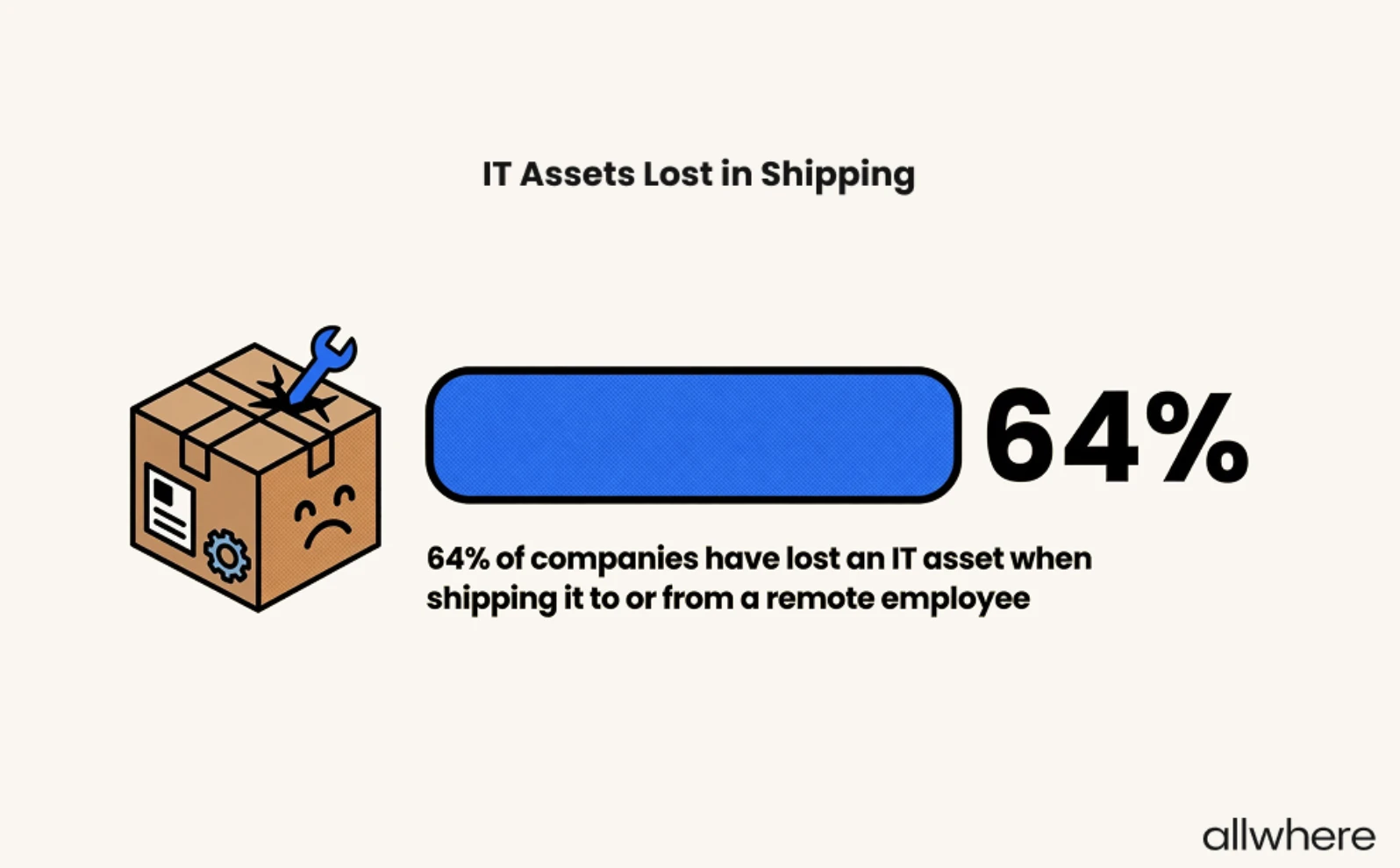
Given that nearly two-thirds of today’s companies have lost an IT asset at some point during shipping, this provides valuable peace of mind.
Beyond that, you can leverage key features like automatic software update reminders to keep devices working at their best, and you know that top-tier customer service is available.
allwhere Dashboard
Now let’s go into some more detail about the nuts and bolts of how IT asset management companies like allwhere enable you to monitor your IT equipment at a glance.
It all boils down to a simple, centralized dashboard for a single point of truth.
For example, allwhere’s dashboard gives you instant access to essential asset data like device, device type, make, assignee, serial number, condition, and status.
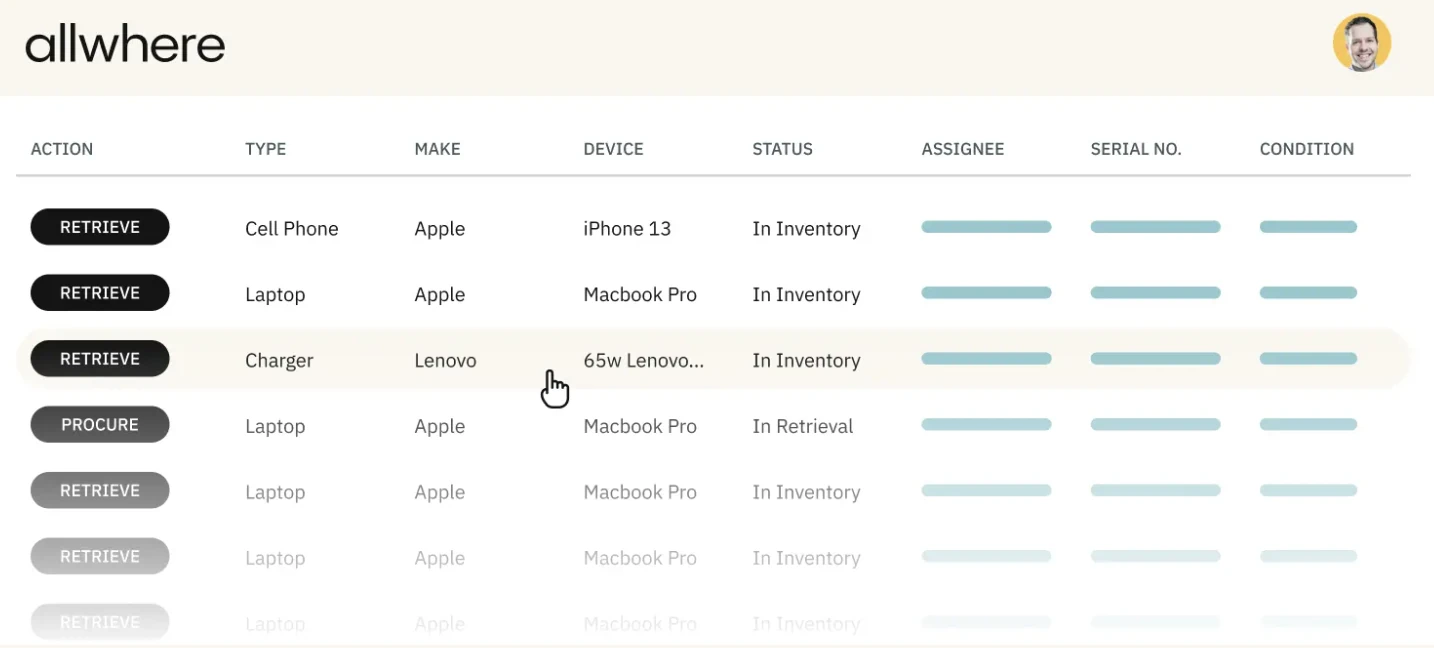
This allows you to configure your dashboard so that it’s specifically tailored to your organization’s unique needs.
allwhere gives you a clear overview of your asset orders, including what’s in transit, what’s in progress, and what needs your attention. It also lets you see the exact number of devices you currently have in your inventory, what’s been allocated, and what’s ready for deployment.
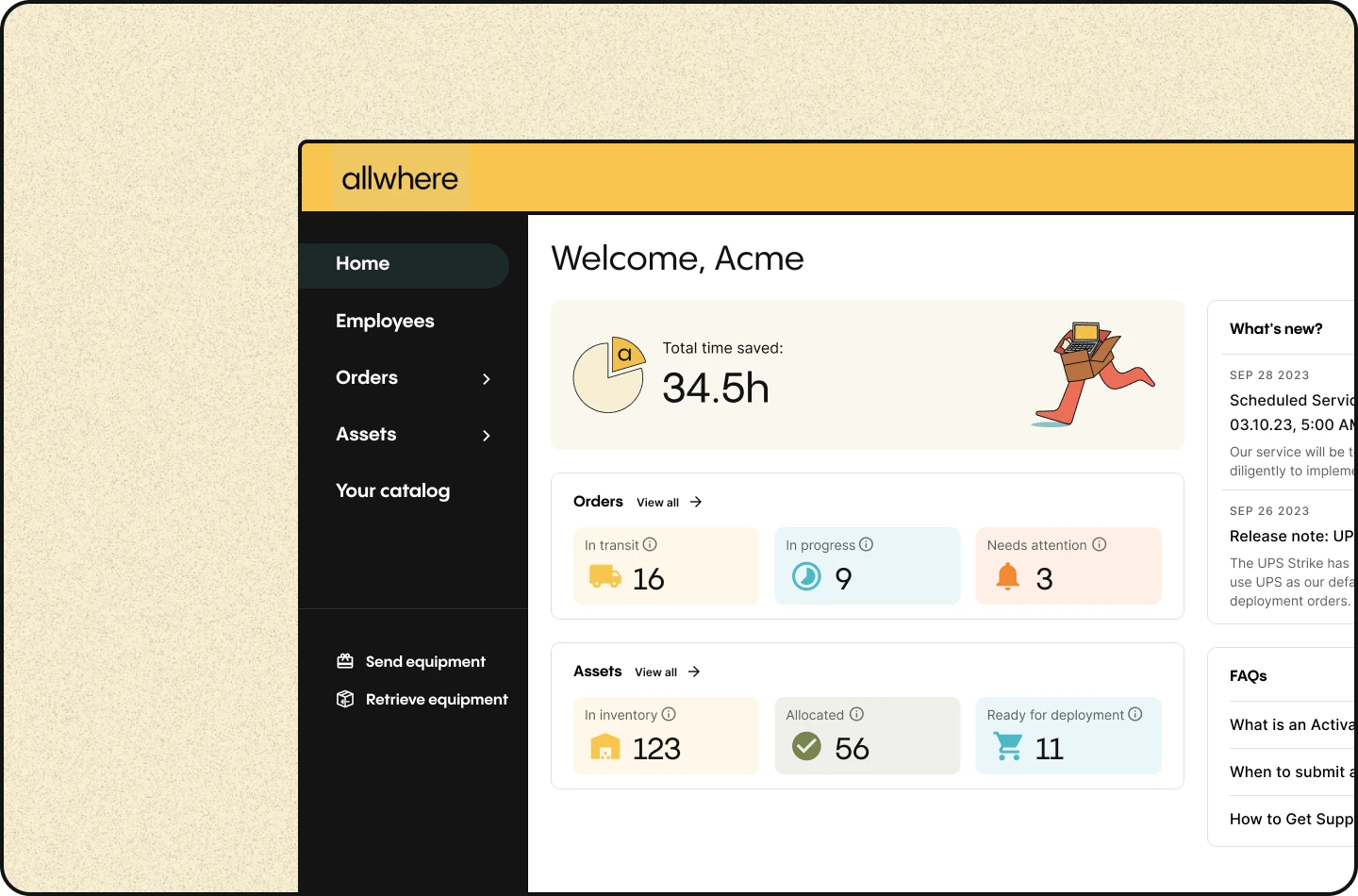
So rather than having your asset records fragmented or spread across multiple platforms, allwhere lets you condense everything into one simple resource.
Whether it’s monitors, laptops, mobile devices, accessories, or anything else, you can keep tabs on your IT inventory from a single asset management software.
This can be incredibly helpful for companies of any size and working arrangement. But it can be a true game-changer for organizations with a remote/hybrid-heavy workforce that continually deal with complicated logistics.
As you move throughout the asset management lifecycle from asset discovery to procurement to deployment to management to storage to retrieval, you’re always in full control, which makes your IT team’s life simpler and more stress-free.
Get the full scoop on allwhere and learn about our key features and customer service here.
Closing Thoughts
IT ticketing and asset management are two sides of the same coin. A ticketing system tracks issues with the assets, while asset management tracks assets themselves.
When used in conjunction, it should create a highly functional IT ecosystem with fewer disruptions and increased productivity.
