

Article by

Topics

One platform to manage the entire IT device lifecycle
GET STARTEDWith many companies today having hundreds or thousands of physical IT assets in their inventory, maintaining full hardware visibility isn’t just a luxury. It’s essential for budgeting, optimizing asset usage, compliance, security, and more.
Below, you’ll learn everything involved in hardware asset management and how to build structured workflows for greater operational efficiency.
If you’re improving your IT asset management program, we created a few ungated resources to help you with that. Check out our:
- IT Asset Policy Generator
- Laptop Depreciation Calculator
- IT Strategy Plan Template
- IT Onboarding Checklist
What is IT Hardware Asset Management?
Hardware asset management, or HAM, is the process of managing hardware assets throughout their entire lifespan. Unlike software asset management, which focuses on software assets, HAM exclusively focuses on physical assets.
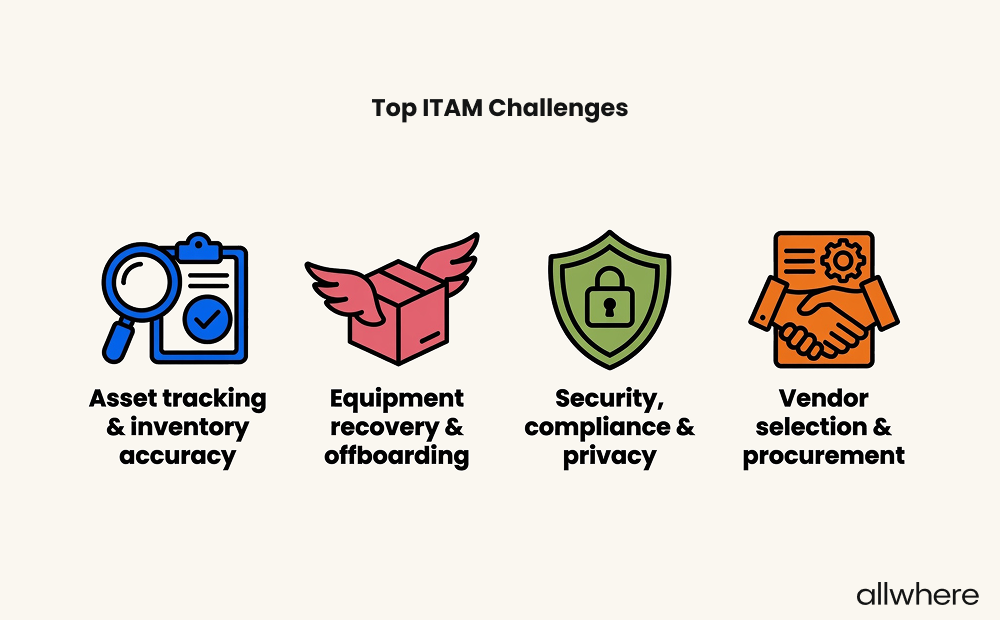
In a recent IT asset management best practices survey we did, we found that IT professionals identified these four things as the top ITAM challenges:
- Asset tracking & inventory management
- Equipment recovery & offboarding
- Security, compliance & privacy
- Vendor selection & procurement
From planning and procurement to deployment and configuration, tracking and maintenance, retirement and disposal, it’s designed to put asset managers in the driver’s seat of the hardware asset management lifecycle.
It’s all about constructing and maintaining an accurate inventory of your hardware assets so that at a glance you can see:
- Which physical assets have been deployed
- Which employee has what
- Where each device is located
- When a device is in transit
- When it’s in storage
- Asset utilization trends
- What condition each device is in
- When maintenance or updates need to be made
- Depreciation history
- When a device needs to be decommissioned
Having full transparency of your IT hardware inventory is one of the main purposes behind HAM. But it goes much deeper than that.
For example, it also helps you better understand where your IT money is going, how cost-effective your spending is, and potential inefficiencies in your strategic portfolio management.
And this, combined with proper software asset management, can bolster security, ensure compliance, and generally keep operations management more productive.
Types of Hardware Assets Covered by HAM
As for specific types of assets, effective hardware asset management can cover the following:
- Laptops
- Desktops
- Tablets
- Smartphones
- Other mobile devices
- IoT devices
- Keyboards
- Mice
- Routers
- Printers
- Scanners
- Electronic accessories
- Network security devices
Basically, any type of physical asset that’s used by in-house, remote, or hybrid employees to perform their job duties can fall under the coverage of hardware asset management.
The IT Hardware Asset Management Lifecycle
Planning and Procurement
This is the first phase of the hardware asset management lifecycle. It deals with an asset manager deciding what types of hardware assets are needed, what your budget is, and researching potential vendors.
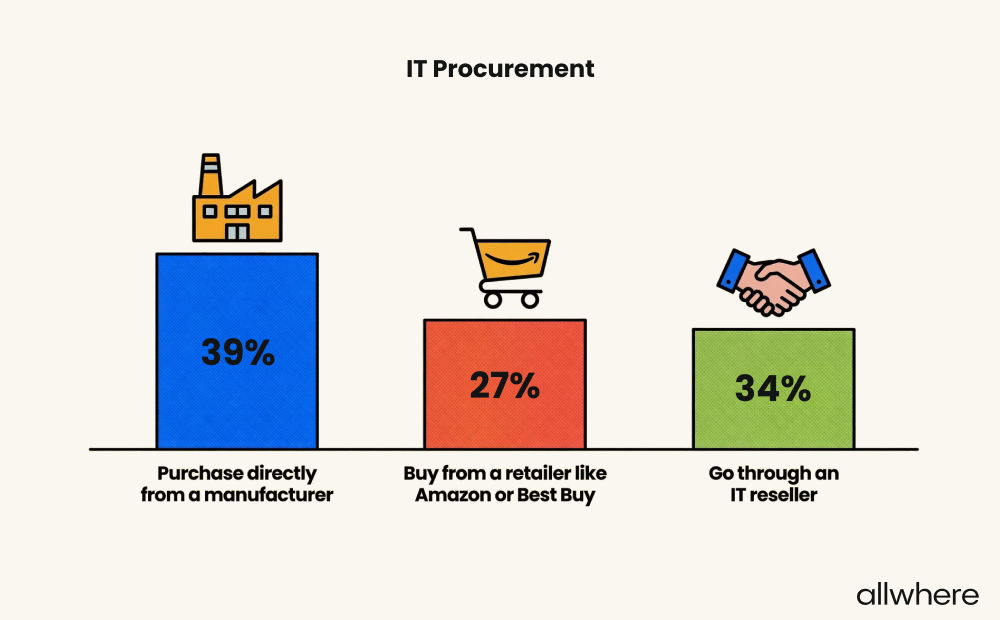
In our ITAM survey, we found that IT professionals source their hardware somewhat evenly from three different sources:
- Purchase directly from a manufacturer - 39%
- Buy from a retailer like Amazon or Best Buy - 27%
- Go through an IT reseller - 34%
Once you’ve identified which vendor you want to purchase from, you’ll negotiate contracts, discuss warranties and delivery dates, learn about customer support policies, and potentially look into a volume discount if you’re purchasing a large number of devices.
Like every other area of asset management, a big part of being successful with planning and procurement is creating standardized workflows that can be iterated on later.
For instance, this can include deciding which employee is responsible for what, the chain of command, and approval requirements.
And it’s at the procurement stage that you’ll officially want to add all new hardware assets to your inventory.
Deployment and Configuration
At this point in the IT hardware lifecycle, you’ll have the IT assets in your inventory, and it’s time to distribute them to your workforce.
Here you’ll want to first inspect equipment to make sure that 1) everything you received is correct and 2) there’s no damage.
After that, you’ll want to assign an asset tag and configure hardware assets by installing software, updating access settings, and configuring security parameters.
From there, it’s time to deploy devices by distributing them throughout your hardware asset workspace. For on-site employees or hybrid employees, this is pretty straightforward.
But for fully remote employees, there are more logistics involved, especially for those working internationally.
Once a device is officially in the hands of an employee, you’ll want them to confirm and make an asset record of when the device was received.
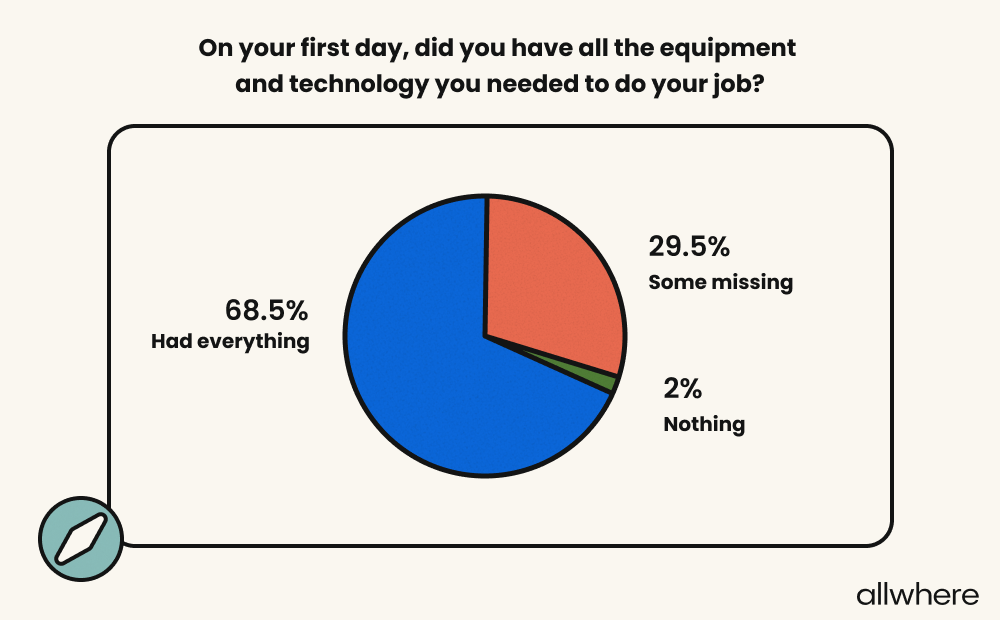
Our own research have found that this is an essential part of employee onboarding that many companies get wrong. Our employee onboarding statistics survey found that 29.5% of employees have missing technology equipment on their first day on the job.
Tracking and Maintenance
Another critical part of effective IT asset management is using continual asset tracking as changes are made.
If, for example, an employee is originally located in one state when an asset was deployed but has since moved to a different state, your asset inventory would need to be updated.
Or, if a device moves from one employee to another, your hardware inventory would also need to be updated with fresh asset data.
As for maintenance, this is something you’ll need to stay on top of at all times, as this factors heavily into the increasing average lifespan of devices, productivity, security, and compliance.
Here, you’ll want to keep track of things like when software and security updates need to be made, when devices need to be serviced, and when warranties expire.
Retirement and Disposal
Eventually, every piece of IT equipment will reach the end of its usable asset lifecycle. Most business laptops, for example, need to be replaced every three to five years to ensure optimal functioning and not become a security liability.
Having retirement and disposal baked into your hardware asset management workflow will provide you with a step-by-step process to follow that allows you to decommission equipment efficiently and responsibly. We take IT asset disposal very seriously at allwhere.
Some specific tasks involved could include:
- Removing assets from your inventory
- Using data wiping to protect sensitive information on devices
- Outlining criteria for recycling, reselling, or outright disposing of devices
- Using responsible, environmentally safe practices when disposing of devices
- Documenting when equipment has been decommissioned with hardware asset management software
Hardware Asset Management Best Practices
If you want a detailed overview, we wrote an in-depth post on IT asset management best practices, which also contains information on software asset management. But here are the highlights.
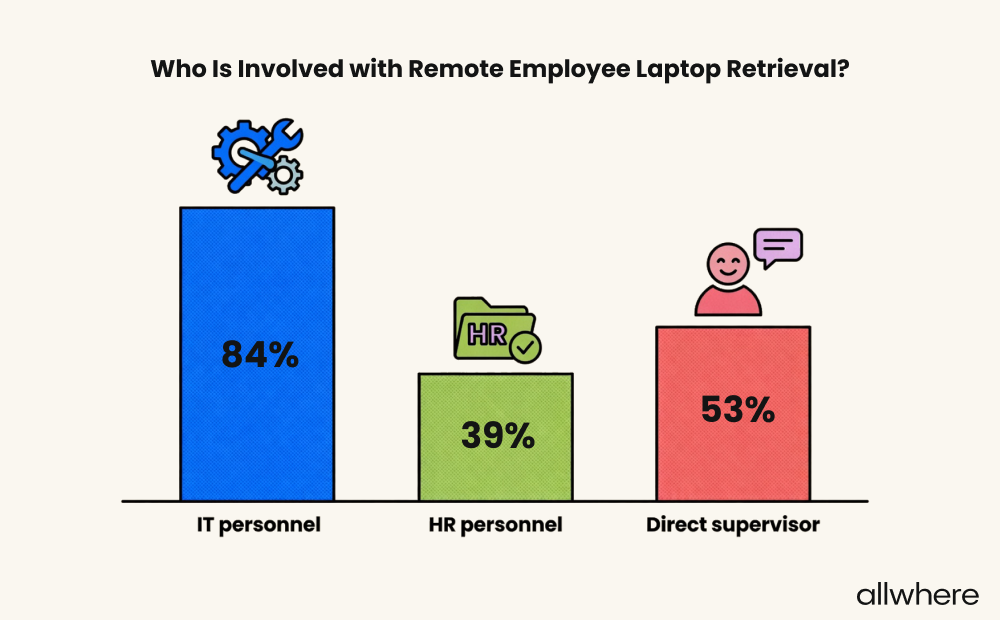
First, figure out who’s in charge of the asset lifecycle management process and what their specific role is. For instance, data from our survey found that IT personnel were involved with laptop retrieval 84% of the time.
Having clear ownership like this should ensure critical tasks aren’t overlooked and provide consistent accountability and integrated risk management.
Another core best practice is implementing the right asset management software into your workflows.
For example, allwhere provides full visibility into your hardware asset inventory, along with detailed tracking from an asset management executive dashboard, so you always have a single point of truth.
That way, you always have critical asset information like which employee has what device, what the location is, and more.
Another helpful asset management tool is mobile device management (MDM), which allows you to perform asset discovery, install software, lock equipment, and make updates remotely, which is extremely helpful if you have a remote/hybrid-heavy workforce.
Beyond that, other best practices include:
- Using automation whenever possible
- Using service management to handle the bulk of ITAM logistics and communication
- Creating a visual map of the entire asset management process end-to-end
Common Challenges in IT Hardware Asset Management
In most cases, the number one challenge companies face is struggling to maintain 100% visibility of asset inventory. This can be a considerable issue for smaller businesses, but it can really be problematic for enterprise-level businesses with hundreds of employees.
That’s why getting transparency under control should always be a top priority with hardware management.
Another challenge is spending too much time on hardware inventory management. For perspective, our survey found that 25% of organizations spend 11 - 20 hours per week on ITAM and 37% spend over 21 hours.
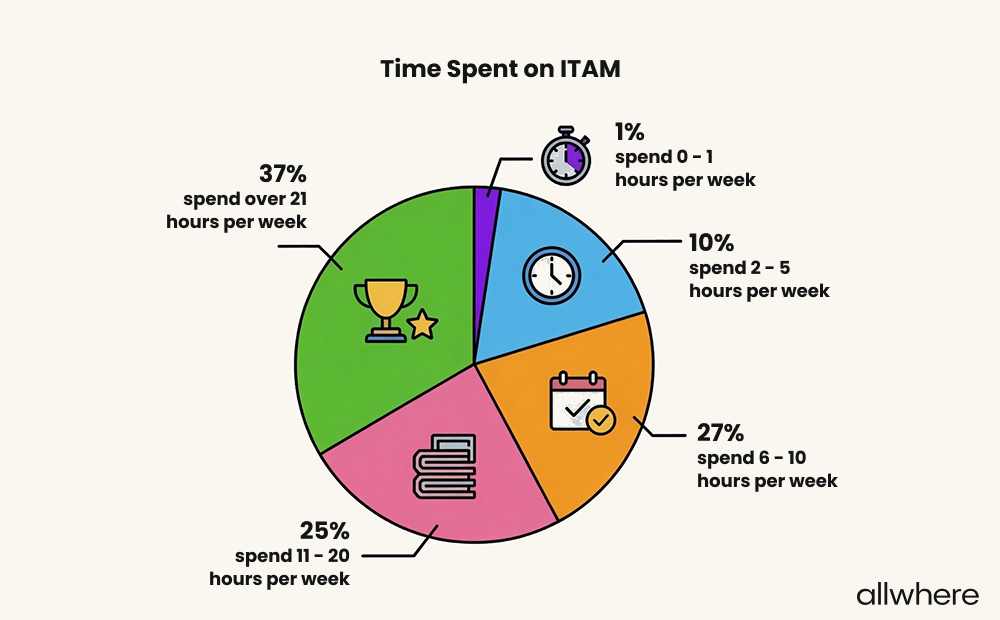
If left unchecked, this can eat up far too much manpower, which is why so many companies can benefit from strategic planning and using IT asset management services or ITAM software.
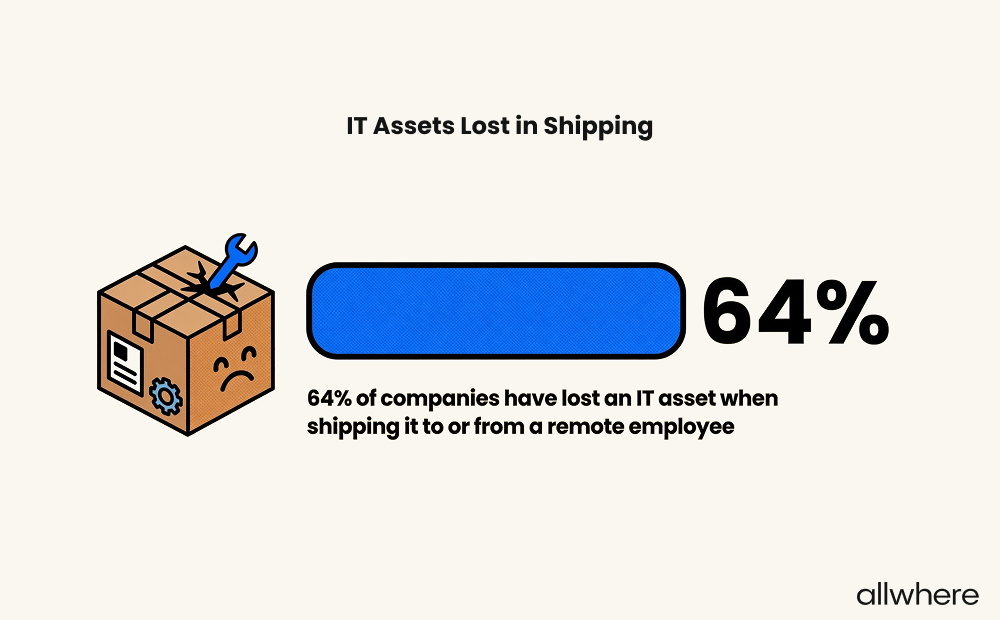
There’s also the issue of losing hardware assets when either shipping to a remote employee or having a remote employee ship assets back to your company.
Our data found that 64% of businesses have lost at least one asset at some point, which again shows the importance of robust asset tracking.
Finally, asset data security can always be a challenge, especially when it comes to remote employees.
Whether it’s failing to safely control access settings, not properly wiping a device when decommissioning, or an employee losing a device, there’s a lot that can jeopardize network security.
Hardware Asset Management for Distributed and Remote Teams
According to Gallup, 26% of modern employees work exclusively remotely and 52% work hybrid. By these numbers, more than half of all companies will need a strategy in place to get hardware assets into the hands of employees working from home.
There are four main elements involved with this.
One is building a standardized, scalable system for ordering and shipping hardware assets to distributed and remote teams. This can include shipping from a centralized facility or smaller hubs scattered throughout the country or globe.
Or, if you don’t want to deal with the logistical complexities, you can outsource this task to a service management provider like allwhere who will handle the process from start to finish.
If you’re dealing with international employees, you’ll also need to take into account things like shipping restrictions, customs, and import taxes.
Because these are ever-changing, you’ll need a dedicated staff member or team to stay current or outsource it to a service management provider.
And of course, let’s not forget about equipment retrieval, where you’ll need a standardized workflow for moving hardware assets from employees back to your company.
Usually, the best way to go about this is to send a retrieval kit that contains a box, return label, packing materials, and instructions to an employee.
Finally, there’s asset visibility. We’ve covered this fairly extensively throughout this post, so we won’t get into the details here. But it’s important to have asset management software to keep track of asset data and enforce security/compliance requirements.
Wrapping Up
Regardless of your business size, a well-fleshed-out hardware asset management strategy is important for improving productivity, asset performance, IT ROI, and much more.
If you’re looking to take the hassle out of the asset management process, allwhere is an excellent solution.
We handle the full spectrum of hardware management from procurement to retirement, along with logistics and communication, while offering detailed asset tracking from a convenient dashboard.
Learn more about how allwhere can automate your hardware asset lifecycle.
