

Article by

Topics

One platform to manage the entire IT device lifecycle
GET STARTEDAt first glance, providing your team with IT assets like laptops, tablets, and mobile devices may seem pretty straightforward. But there’s a lot of planning, coordination, and logistics that go into it.
Here, we’ll unpack the entire IT asset management lifecycle to help you get the best ROI while ensuring security and compliance.
The 5 Stages of the IT Asset Management Process
Stage 1: Planning and Budgeting
Before you ever spend a dime, you first need a crystallized game plan to guide your strategy every step of the way.
You’ll want to start by assessing your current IT asset management process and identifying strengths, weaknesses, and any gaps that need your attention.
From there, you’ll want to:
- Determine current asset usage
- Decide which types of devices you need
- Forecast future demand
- Determine your budget
- Assign IT asset management positions to appropriate team members
- Create approval workflows
Keep in mind that this will be iterated on over time, but you’ll want to iron out the basics here.
To help you in that process, we created an ungated laptop depreciation calculator and IT asset policy generator.
There are many considerations here. For example, in our laptop replacement research, we found that the average laptop needs to be replaced every 3-5 years. This might seem obvious. But what’s less obvious is that it varies quite a bit by brand, as you can see in this graph.

Do you automatically replace all laptops every 3 years so that they’re covered by extended warranties? Or do you try to get the maximum lifetime value out of every one by not replacing them until they break 5-6 years in? These are things you have to consider in your planning.
Stage 2: Procurement and Acquisition
You’ll need to research vendors, compare their pros and cons, and select those that best align with your business needs.
Some specific areas of interest include product pricing, quality, shipping speed, warranties, service management, and customer support.
Once you’ve made your decision, you’ll need to negotiate contracts and inquire about discounts for volume ordering.
After agreements have been made and contracts signed, you’ll officially purchase the IT assets and receive them. Note that assets may arrive at a physical on-site location or be shipped directly to remote workers.
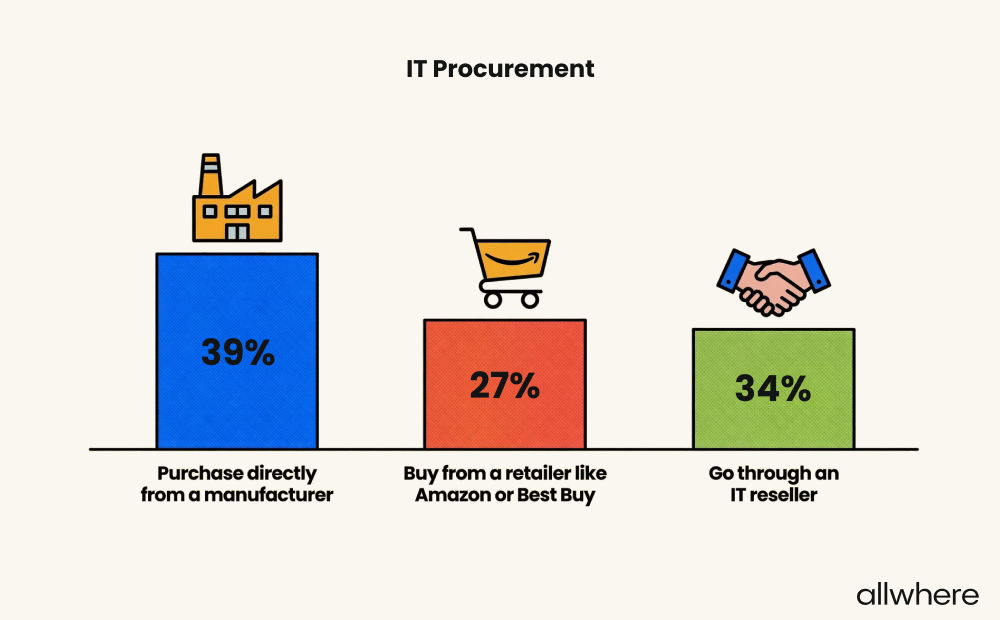
In our IT asset management survey, we found that IT professionals procurement equipment somewhat evenly across three different sources:
- Directly from the manufacturer
- From retailers
- From IT resellers
Stage 3: Deployment and Integration
At this stage, the goal is to efficiently get the right assets to the right employees while streamlining onboarding and reducing friction.
A big part of achieving this is to pre-configure devices so workers can quickly get them up and running and dive headfirst into their tasks with no delays.
Therefore, it’s common for businesses to do the following:
- Set access controls
- Install security features
- Install relevant software and apps
- Integrate devices with existing platforms
Note that it’s also important to keep detailed records of which employees have what devices, device locations, and when equipment was deployed.
Stage 4: Asset Tracking and Maintenance
Regardless of the size of your asset inventory, maximum visibility is essential. Not only is this critical for safety and compliance, but it also ensures you’re current on device health, system updates, and maintenance scheduling.
As for the logistics of inventory management, many modern ITAM platforms offer asset monitoring solutions for real-time visibility via a configuration management database.
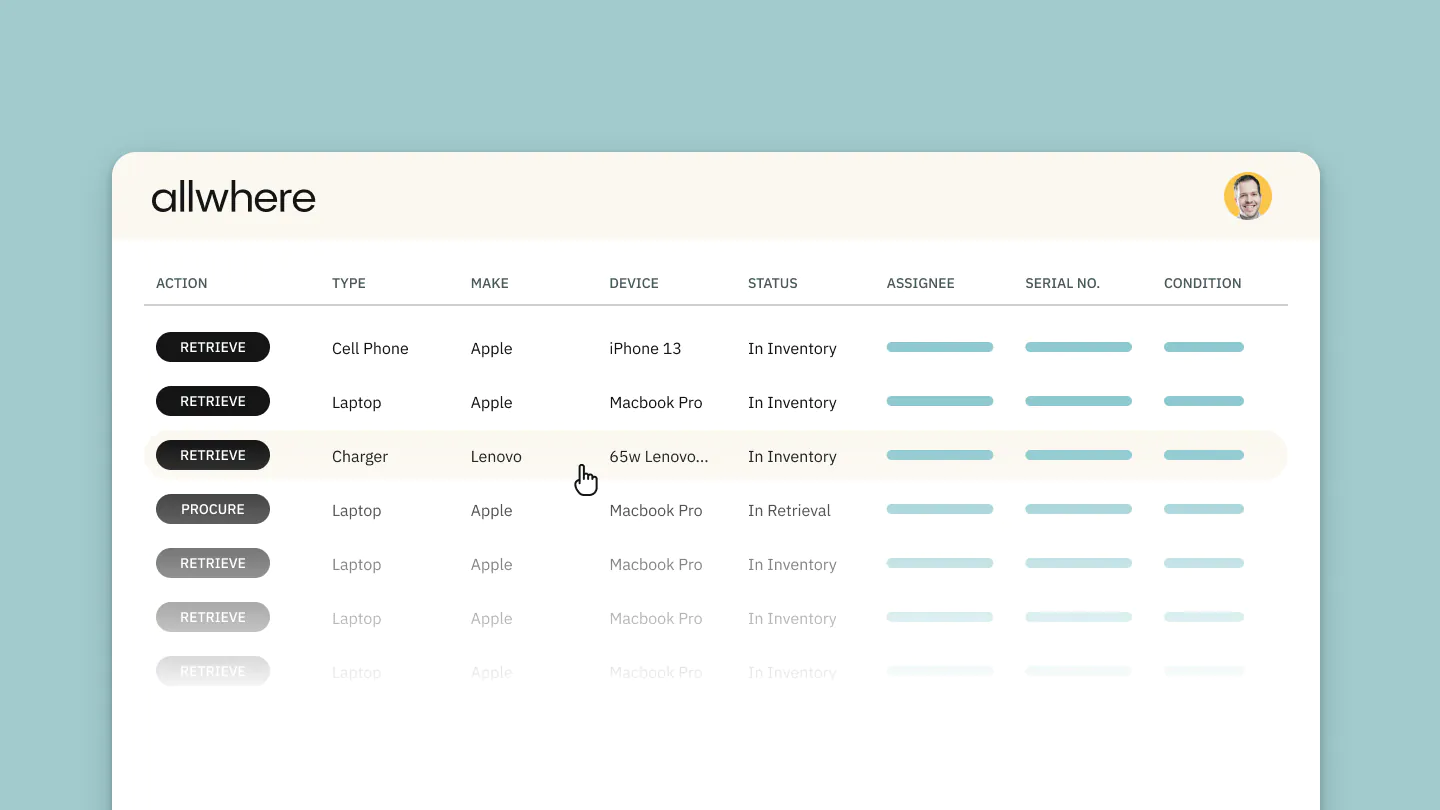
For instance, with allwhere IT asset lifecycle management, you can track everything conveniently from a single dashboard. This allows you to see all devices your employees have, locations, what’s been deployed, and what’s in storage for stress-free digital asset management.
Stage 5: Decommissioning and Disposal
Eventually, every piece of technology will reach the end of its usable lifespan, and asset disposition becomes necessary.
The final phase of effective IT asset management is developing a structured approach to removing equipment from your inventory while practicing proper risk management.
Decommissioning can include:
- Revoking employee access
- Backing up data
- Using data wiping to ensure sensitive information on hardware assets can’t be exploited
As for asset disposal, you can either recycle or resell equipment as a whole or for individual parts. Or, if it’s no longer usable, you can responsibly discard it altogether.
Hardware vs. Software Asset Management Processes
As we mentioned earlier, hardware includes physical assets like desktop monitors, laptops, mobile devices, electronic accessories, and peripherals.
Software, on the other hand, includes software subscriptions, apps, cloud-based products, and digital services.
When approaching hardware asset management, you’ll need to figure out how to efficiently procure, deploy, track, manage, and retrieve equipment.
And for software asset management, it’s more about monitoring software usage, buying the right number of licenses, ensuring licenses are up-to-date, having efficient service management, and maintaining compliance.
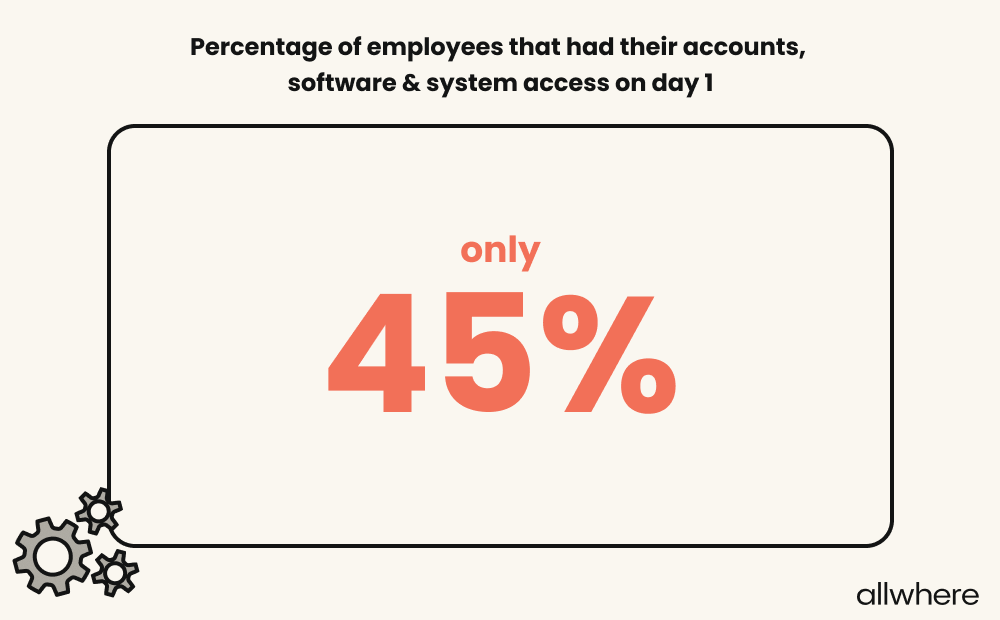
Interestingly, in our recent employee onboarding statistics survey, we found that only 45% of employees had full access to their accounts, software, and system on day 1.
Although hardware and software asset management are technically two different areas of ITAM, most businesses benefit from taking a holistic approach to the two.
Say, for example, a laptop reaches the end of its usable lifespan and is decommissioned. At that point, you would want to either end software subscriptions or digital services on the device or transfer them to a new device.
That way, you should maintain accurate inventory for both hardware and software, which is important for optimal asset utilization, future budgeting, and forecasting.
Building an Effective ITAM Strategy
Like any other type of business process, building a strong ITAM strategy relies on two main elements — structure and standardized procedures.
A good starting point is to build a chain of command within your organization that covers your asset lifecycle end-to-end. For instance, you’ll want to decide who’s responsible for asset procurement, deployment, service management, decommissioning, and so on.
When everyone knows their responsibility, you’re far less likely to run into snags and can create consistent operational efficiency.
Next, you’ll want to have a single point of truth for both hardware and software asset management.
allwhere’s asset management software, for example, allows you to conveniently monitor your entire IT asset inventory from a user-friendly dashboard so you always have a bird’s-eye view.
Rather than having to juggle multiple spreadsheets and software, you’re always in control and up-to-date.
And given how far technology has come in recent years, we highly recommend using automation as part of your asset management strategy.
Some examples include automatically adding new devices to your inventory, sending out maintenance reminders, and notifying you when subscriptions or warranties are about to expire.
Further, it’s important to have specific KPIs that you can continually measure to see what’s working and what needs improvement. Some examples can include equipment costs, equipment usage rate, average deployment time, and average asset lifespan.
Key Roles and Responsibilities in the ITAM Process
As we mentioned earlier, having a well-structured ecosystem where everyone knows their role is an important part of IT asset management best practices.
To achieve this, you’ll want to create a hierarchy where each person’s role and responsibilities are clearly defined so team members can seamlessly collaborate with one another.
Although each company’s setup will look a little different, here are some common examples of roles and responsibilities.
- IT asset manager - Oversees the ITAM process as a whole, is a key contributor in establishing information technology policies, monitors compliance, tracks technology asset performance, and handles change management and cloud asset management.
- Procurement manager - Involved in researching hardware asset and software asset vendors, negotiating contracts, and purchasing your organization's IT assets.
- System administrator - Handles device configuration, software installation, deployment, maintenance, troubleshooting tech issues, and replacing equipment that reaches the end of its lifespan.
- Security manager - Responsible for restricting employee access, making timely software updates, resolving security issues, and overseeing data wiping when devices are decommissioned.
IT Asset Management Process Best Practices
We’ve touched on asset management best practices slightly in the section on building an effective asset management strategy, but let’s dial it in further.
Perhaps the most important aspect is not just having a single point of truth for asset lifecycle management but actively maintaining it. Then integrate that platform with others so that all data flows together naturally. For example, allwhere (an ITAM hardware platform and service) integrates with popular MDMs, which are the software source of truth.
This way, you have up-to-date, accurate records of hardware asset and software asset data, as well as maintenance records, warranty expiration dates, and other critical information.
Again, automation can be incredibly helpful for getting more done in less time and can dramatically reduce the amount of manpower needed to maintain efficient ITAM operations.
This contributes heavily to asset management best practices because asset discovery tools, maintenance updates, and warranty expiration notifications are all helpful in simplifying your team’s life and saving time.
Besides that, ongoing audits are important for confirming that what your asset management software records say you have on hand with physical assets match what you actually have.
And for software assets and cloud assets, you can be sure there haven’t been any unauthorized installations.
Common Challenges in the IT Asset Management Process
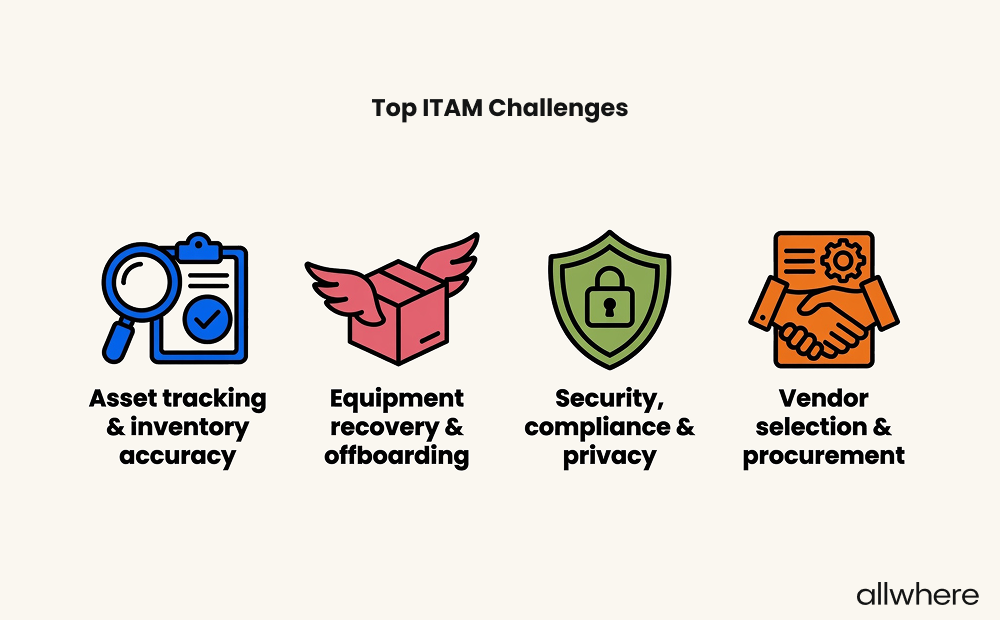
In our ITAM survey, IT workers identified these four areas as top challenges.
Today’s workforce is incredibly diverse in terms of working arrangements. According to Gallup data, 22% of today’s employees work remotely.
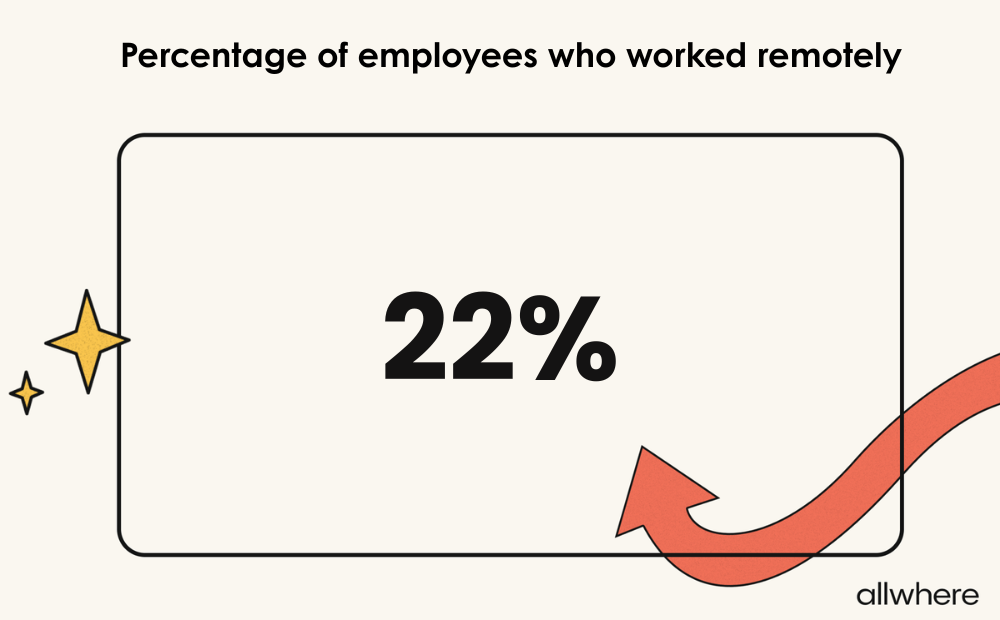
Therefore, one of the biggest challenges is efficiently distributing equipment and retrieving devices from workers in different offices, states, and countries. Logistics can be highly complex, especially when you’re dealing with international workers.
This brings us to another major challenge, which is asset visibility. Whenever you have dozens, hundreds, or even thousands of devices scattered around the globe, keeping track of your current inventory can be a serious headache.
Combine that with software, apps, cloud subscriptions, and warranties, and it can be incredibly complicated.
Next, there’s the issue of continually decommissioning equipment.
Whether it’s due to obsolescence — something that happens quickly with many devices — or simply needing to update equipment to minimize security and compliance risks, the logistics can be problematic, especially if you’re a larger company operating at scale.
And without careful budgeting, it’s easy for companies to overspend on IT assets, which can be detrimental to employee productivity and create a host of other problems.
Tools and Software for the IT Asset Management Process
Whether you’re running a small business, a large enterprise, or something in between, having the right tools and asset management software can truly be a game-changer for ITAM operations management.
A non-negotiable is finding a platform that offers robust inventory management, where you have a centralized inventory dashboard of all your devices and software.
Even better, you can opt for a platform that offers additional features such as end-to-end asset lifecycle management, warranty tracking, and device maintenance notifications.
Another valuable tool is one that handles device procurement and onboarding, as well as retrieval and storage.
At allwhere, for example, we partner with a huge network of reputable vendors, which allows us to procure quality IT equipment at a reasonable cost. And to facilitate smoother onboarding, we also take care of configuration so employees can get going quicker.
And for retrieval, we send out a kit that allows employees to easily ship their equipment back to you, all while handling logistics, communication, and real-time tracking.
Also, an endpoint management system is ideal for overseeing security, ensuring your security and compliance policies are being enforced, fixing vulnerabilities with patch management, and performing remote troubleshooting.
Closing Thoughts
When an employee is dialed in using a device for work tasks, it’s easy to overlook all of the logistics involved in providing them with that device. But as we’ve learned, there’s a lot that goes into it.
If you’re looking for a one-stop shop for streamlining your IT asset management process, allwhere is an excellent option. We cover the full spectrum of ITAM, including procurement, deployment, storage, retrieval, and much more.
Plus, our user-friendly platform ensures you always have full control and visibility. Learn more about how allwhere can dramatically simplify your ITAM workflows.
