
Article by

Topics

One platform to manage the entire IT device lifecycle
GET STARTEDKnowing which assets you have in your IT inventory is critical. But it’s equally important to understand the technical aspects of those assets and how they interconnect with one another.
That’s where asset and configuration management comes in.
Key Differences Between Asset and Configuration Management
Hardware and software asset management both deal with ownership and value. And for strictly physical assets like laptops and mobile devices, asset management deals with what stage an asset is at in its lifecycle (e.g., procurement, deployment, storage, and decommissioning).
As InvGate explains, the main focus of asset management is the “financial and contractual management of IT assets throughout their lifecycle.”
They also point out that some of the data that’s managed includes “purchase details, cost, depreciation, warranty, license data, vendor information, and lifecycle status.”
As for a configuration management system, it deals with the technical side of things, how each configuration item is set up, and the interconnectedness of an overall information technology infrastructure library.
InvGate mentions that data managed through configuration management typically includes “system configuration, dependencies, versioning, CI relationships, and service impact data.”
How IT Assets and Configuration Interplay Together
Although asset management and configuration management are two distinct ITSM processes, they’re really two sides of the same coin.
To understand why, let’s look at a commonly used service asset in today’s businesses — laptops.
For asset management, you may maintain an inventory of every laptop within your company, including:
- The cost
- When it was purchased
- Where it’s located
- Which employee has it
- What its current condition is
- Its maintenance schedule
- When its warranty expires
Besides that, it may involve:
- Deployment management
- Release management
- Asset discovery
- Service level management
- Enterprise service management
- License management
For configuration management, you may keep track of:
- Its operating system
- Installed applications
- Software versions
- System configurations
- Configuration identification
- Configuration verification
- Access settings
- What other managed services it's connected to
Combining asset and configuration data allows your company to zoom out and gain big-picture insights into your collective IT ecosystem: something that’s an integral part of IT asset management best practices.
That way, you can better understand relationships and dependencies, be more proactive about service management, knowledge management, change management, and problem management, as well as reduce system downtime.
IT Asset and Configuration Management Process
1. Figure Out What You Want to Manage, Your Goals, and Ownership
The first step is to identify which specific assets you’re looking to manage and what you’re looking to achieve long-term for the SACM process.
For example, you may want to manage equipment like desktop monitors, laptops, and mobile devices, as well as the apps and software that your employees use on them.
From there, you’ll want to establish a strategy to help you achieve what you want to accomplish with configuration and asset management.
For instance, one of your main objectives may be to optimize laptop availability, where you’re consistently able to promptly assign laptops to employees but without having an excessive number of laptops in storage.
Once that’s pinned down, you’ll want to decide who’s responsible for what.
For procurement, for example, you may have a dedicated procurement manager who handles vendor management, contract negotiation, and purchasing.
And when it comes to retrieval, you may assign this to IT personnel, which is the route that 84% of today’s companies take.
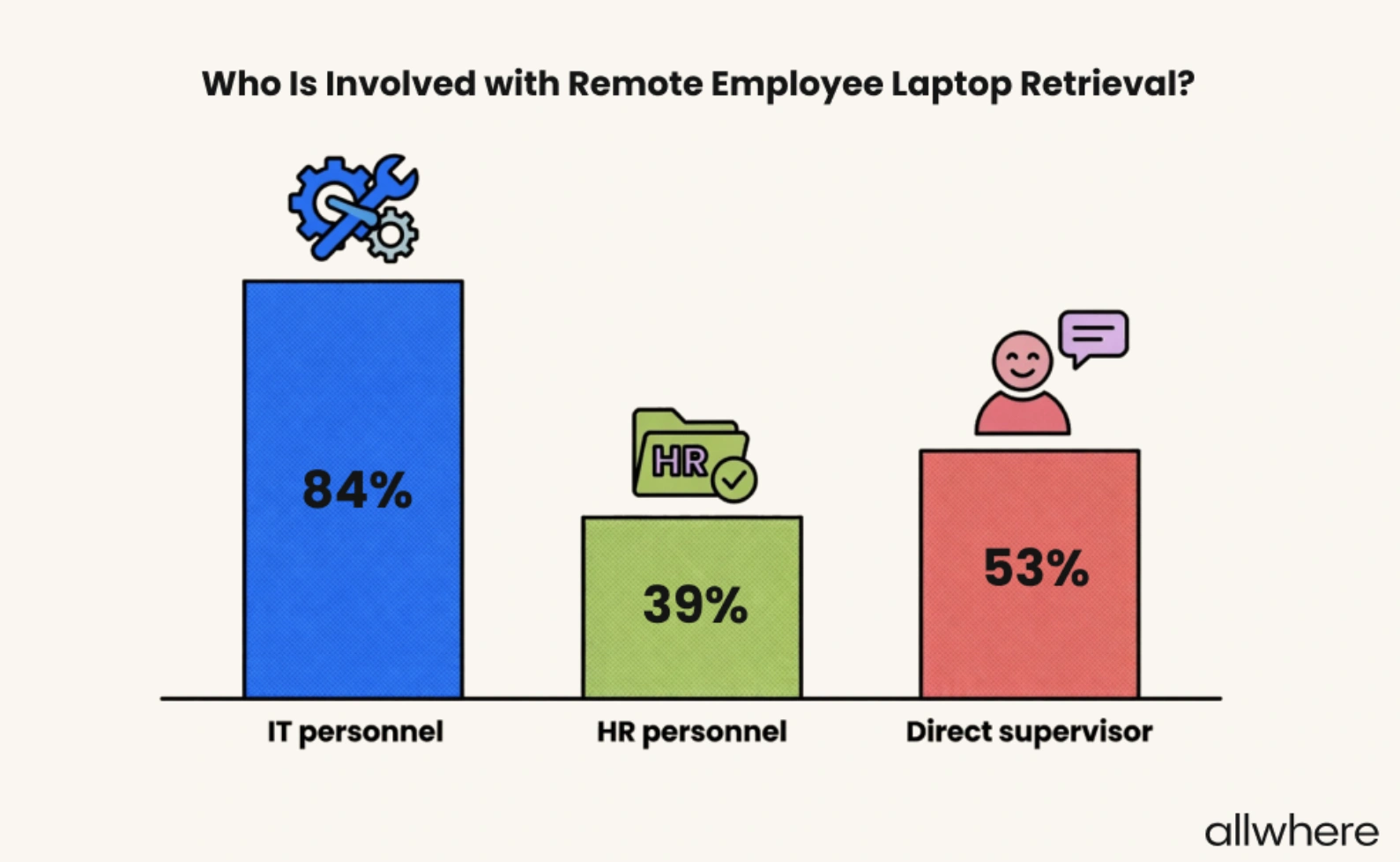
Our in house research found that 84% of the time, IT personnel are the ones involved with asset management.
2. Establish Your IT Inventory
Next, you’ll want to gain full visibility of your existing IT inventory so you 1) have a bird’s-eye view of what you’re working with and 2) can easily add and remove future assets.
For this, you’ll need to pull data from different sources like purchase records, spreadsheets, and physical inventory counts.
Or, if you want to streamline the process, you can use IT asset management services and ITAM software like allwhere. This allows you to effortlessly sync your inventory and make changes as needed over time.
The great thing about this asset management tool is that it provides you with a single dashboard where you can see exactly what you have on hand, what’s in storage, and what’s in transit, so there are never any blind spots with inventory management.
The other core part of establishing your IT inventory is carefully labeling and standardizing asset information, with some examples being:
- Asset type
- Make
- Serial number
- Purchase date
- Cost
- Current owner
- Warranty expiration
- Condition
3. Document Asset Relationships and Dependencies
After you’ve established your IT inventory, it’s time to map relationships between configuration objects, including the assets and services in your configuration management database. Let’s take a laptop, for example.
It may be connected to a VPN to secure sensitive data. It may be connected to SaaS platforms like a CRM to manage customer data, as well as cloud storage for saving important information. Beyond that, it may be connected to a device management platform to make software updates.
In this case, an employee would use their laptop, which is connected to a VPN, to access a CRM and store data on a cloud storage platform. And their laptop would receive automatic software updates.
The goal here is to crystallize the relationships in your IT infrastructure so you know how everything is interconnected, the dependencies within that infrastructure, and who is involved in maintaining it.
4. Manage Ongoing Configuration Changes
Asset and configuration management is by no means a one-off type of deal.
Any time there’s a change between asset relationships or dependencies — even a minor one — it should be documented with a configuration control to ensure accurate configuration information that’s always up-to-date.
Say, for instance, an employee leaves your company, and you reassign their laptop to a new employee. A configuration manager would need to document it, along with taking proper security precautions like data wiping to protect sensitive information.
Or, say you switch to a different CRM. You would need to update your workflow to reflect this change.
Note that you should use automation whenever possible, as this should maintain accuracy without using unnecessary manpower.
Software updates are a prime example, where you can use a device management tool to automatically install new software and simultaneously record the information without the need for human intervention.
Just be sure to have a real person periodically check to make sure everything is accurate. This brings us to our next step in the lifecycle management process.
In terms of a configuration model tool, Jira Service Management from Atlassian Service Collection is a popular option.
5. Monitor the Asset Lifecycle
As we mentioned before, every service asset has a lifecycle that typically moves from procurement to deployment to management to storage to decommissioning. As such, it’s vital that you proactively monitor your inventory throughout the asset management process.
Some specific things to track include asset location, age, health, and value.
Take a service asset like a laptop, for example.
Average laptop value decline looks something like this.
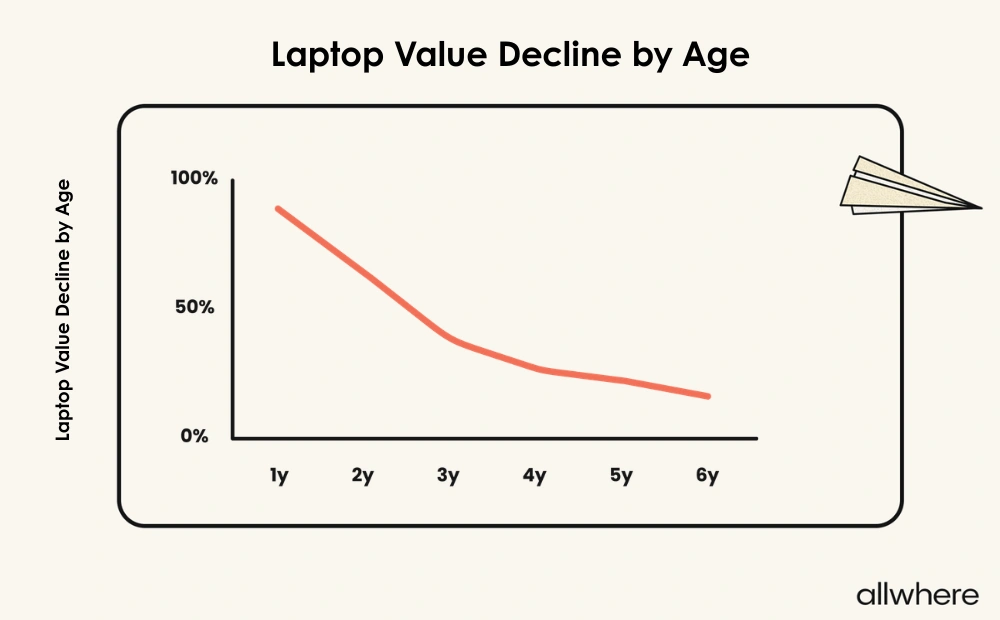
Our multi-brand study confirmed that laptop value declines sharply by 3 years of age.
As for the lifespan of business laptops, most last three to five years, with 3.7 years being the overall average.
.webp)
From the moment an asset is procured, you should continually monitor it throughout every stage of the lifecycle so you know the current state and can track active asset usage, configuration changes, and service management.
And when a device is approaching the end of its lifespan, you should be better positioned to decommission it, which brings us to the final stage in asset and configuration management.
6. Manage Asset Decommissioning
Once an asset has reached the end of its usable life, it needs to be decommissioned, which can involve reselling, recycling, being given to another employee, or disposal.
Regardless of the outcome, you need to have a plan in place to decommission the asset with maximum operational efficiency.
But here’s the thing. Equipment recovery was rated as the number two ITAM challenge by respondents in our survey.
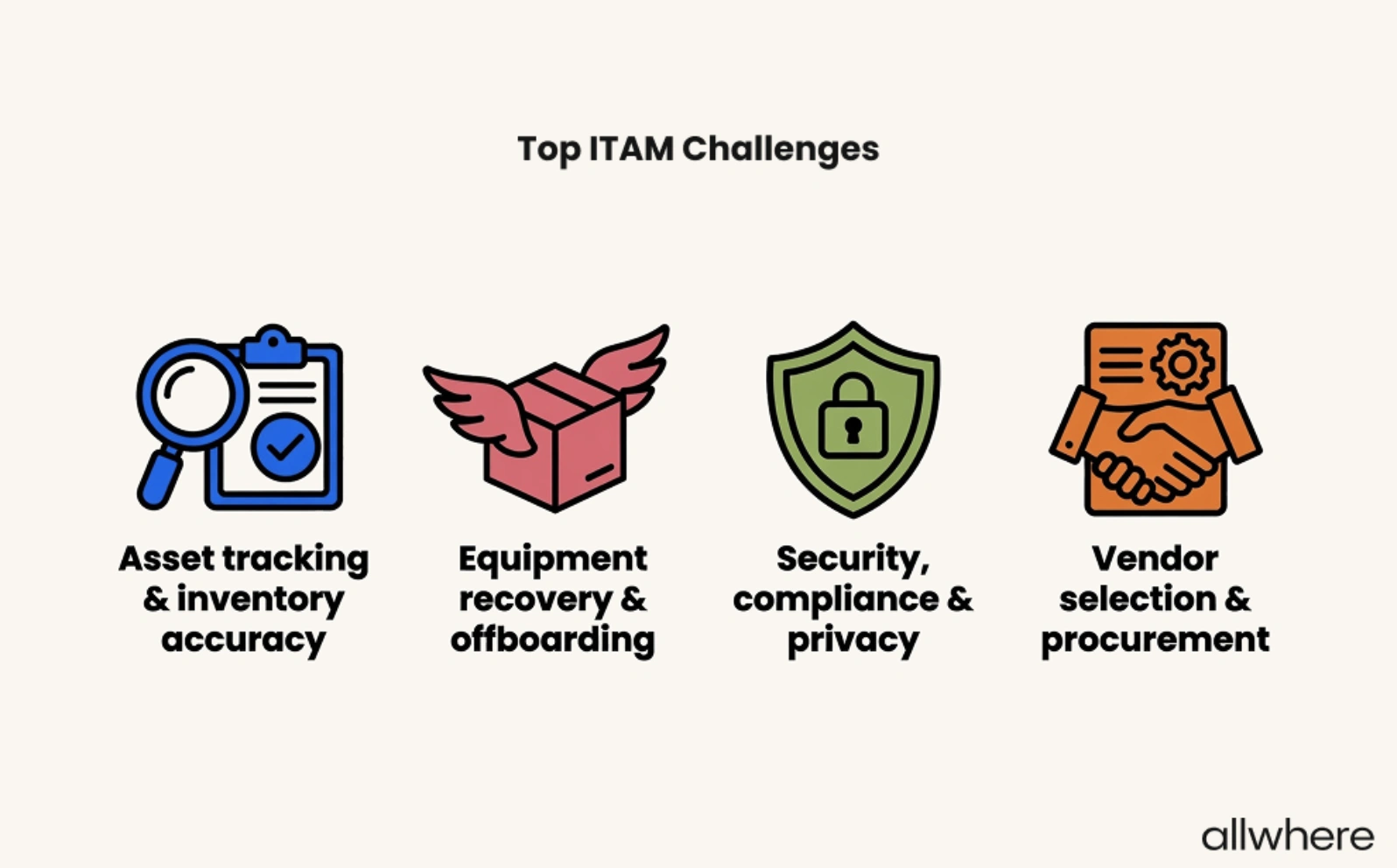
More specifically, losing IT assets in shipping when receiving them from a remote employee was a common issue.
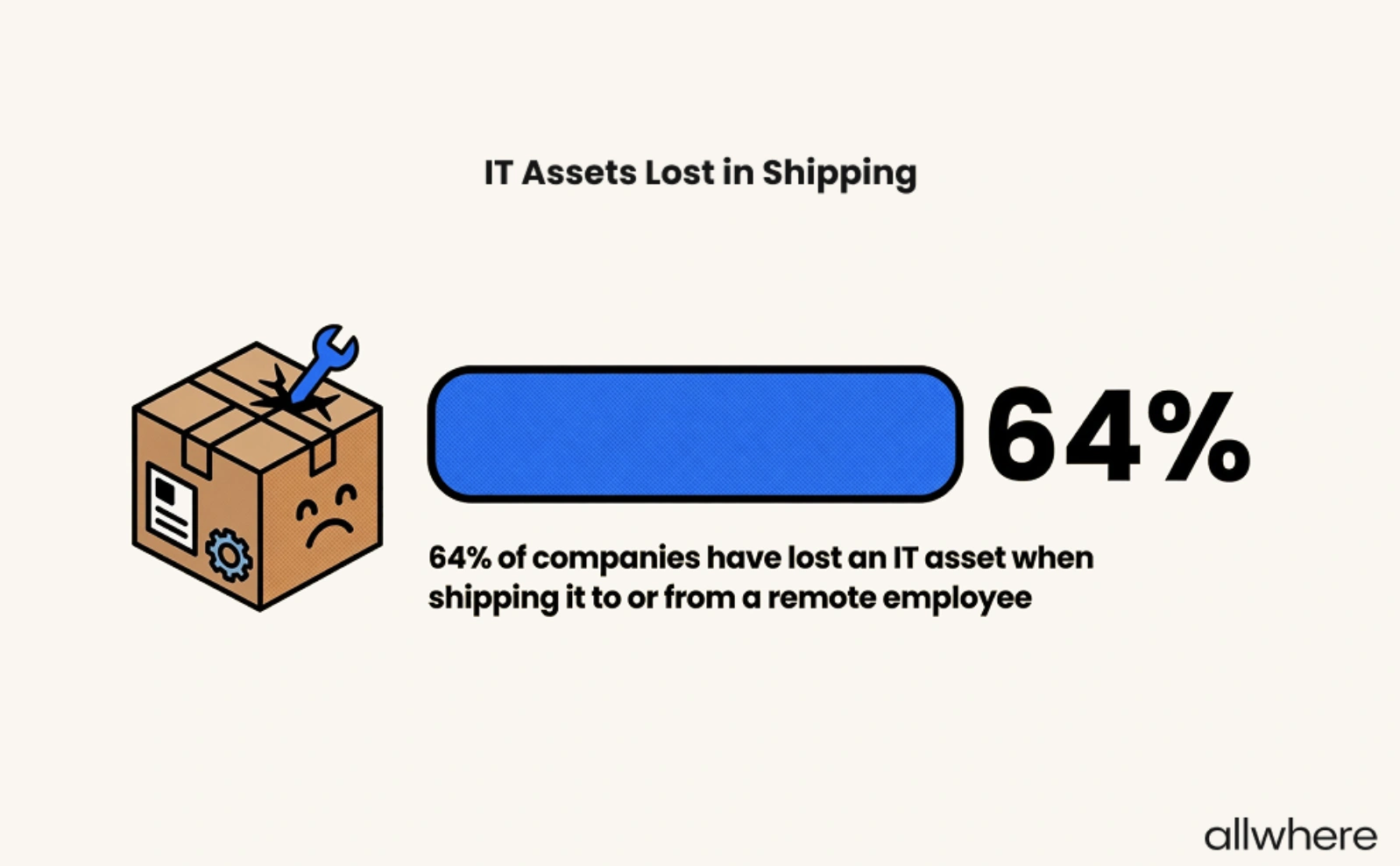
Also, employees refusing to return equipment during offboarding was equally problematic.
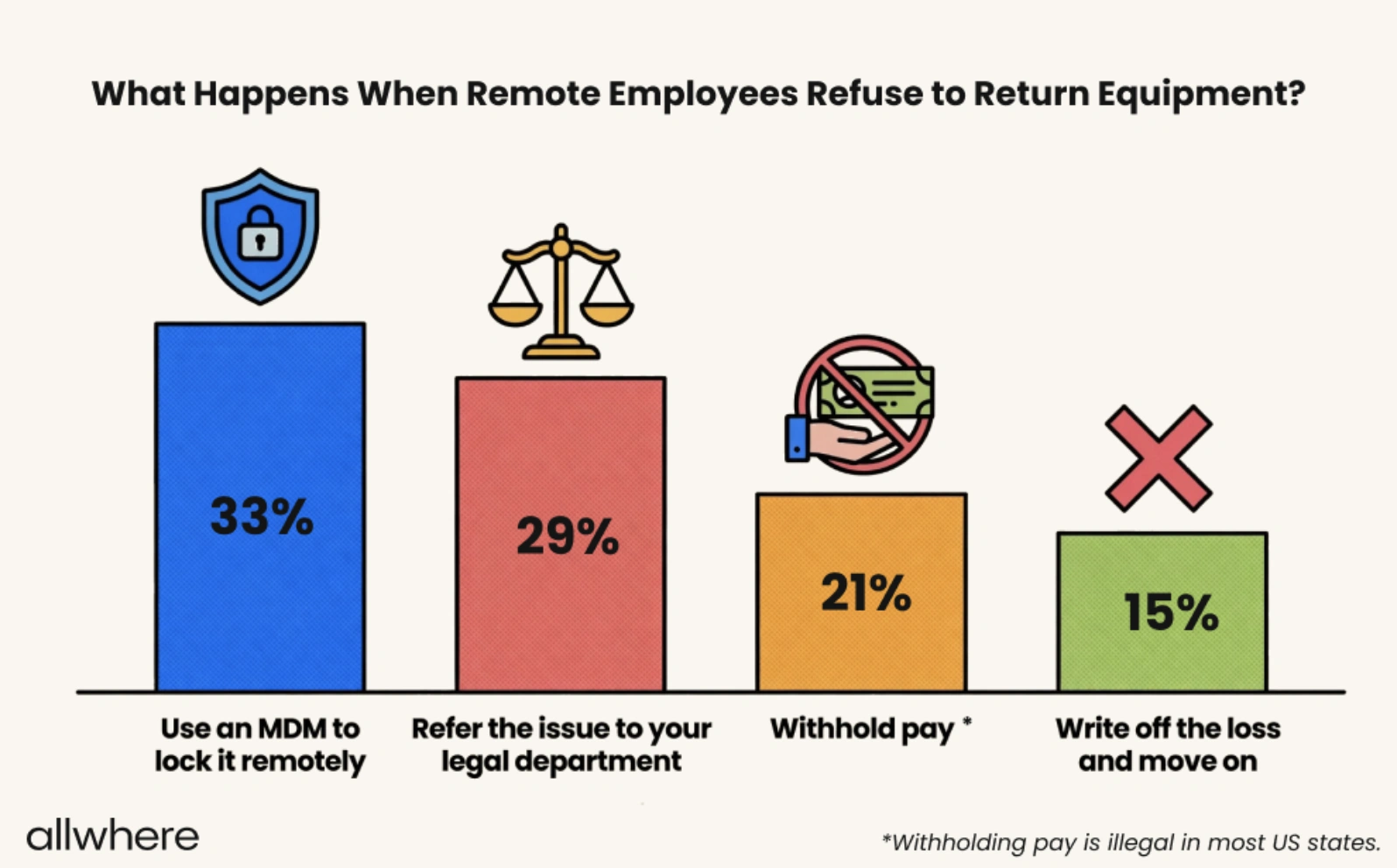
That’s why you need a reliable means of retrieving equipment, such as sending a return kit with a shipping box, return label, packing materials, and clear return instructions. You also need to know what you’ll do if a remote employee refuses to return equipment.
Here are some common strategies today’s companies take, with using an MDM to remotely lock a device, referring the issue to a legal department, and withholding pay being the most popular options.
How allwhere Simplifies the Process for You
If you’re looking to take the complexity and headaches out of asset management, allwhere can help you manage the lifecycle end-to-end.
We’ve been rated as one of the best IT asset management companies, and we handle logistics and communication for a truly hands-off experience.
We also offer convenient asset tracking so you can easily manage everything from a single dashboard for full visibility at all times.
Get a full overview of how allwhere works here.
